
Disk partition management is a crucial aspect of maintaining a healthy and organized computer system. As the amount of data we generate and consume continues to grow, efficient disk management becomes increasingly vital. Partitioning software is the key to achieving this, allowing users to organize, optimize, and safeguard their data effectively. One powerful and user-friendly tool for performing this task is the free partition software MiniTool Partition Wizard 12.8.

Benefits and Uses of Disk Partition Software:
Disk partition software serves multiple purposes, providing users with a range of benefits. These include:
- Optimal Disk Space Utilization: Partitioning allows users to allocate space on their hard drives based on their specific needs. This ensures optimal utilization of available disk space and prevents one partition from encroaching on another.
- Data Organization: Organizing data becomes more straightforward with partitioning. Users can separate the operating system, applications, and user data into different partitions, making it easier to manage and locate specific files.
- Enhanced Performance: Well-managed partitions can contribute to improved system performance. For example, separating the operating system from user data can lead to faster boot times and more efficient data access.
- Data Protection: In the event of system failures or corruption, partitioning can help protect critical data by isolating it from potential damage. Regular backups and efficient recovery options are facilitated through disk partitioning.
Review MiniTool Partition Wizard 12.8:
MiniTool Partition Wizard 12.8 is an all-inclusive partition manager designed to meet the diverse needs of users seeking efficient disk management solutions. With a user-friendly interface and a comprehensive set of tools, this software empowers users to control their disk partitions with ease.
Functions and Features of MiniTool Partition Wizard Free 12.8
- Create/Delete/Format Partition:
- Format inaccessible hard drives and convert RAW to NTFS to revive the hard drive.
- Measure drive performance and analyze disk space usage in simple ways.
- Fully compatible with Windows 11/10/8.1/8/7 all editions.
- Move/Resize Partition:
- Move non-adjacent partitions together for extending purposes.
- Enlarge the C drive to remove low disk space warnings on Windows 10.
- Wipe Disk/Partition:
- Erase data on the partition completely, ensuring it cannot be recovered by any data recovery solution.
- Merge/Split Partition:
- Combine two partitions into one without losing data.
- Split a hard drive into two partitions for various data-saving purposes.
- Convert FAT to NTFS:
- Quickly convert hard drives or flash drives from FAT to NTFS without losing data, enabling the handling of files larger than 4GB.
- Copy Disk/Partition:
- Free copy non-system disks and partitions for instant usage.
- For copying OS disks/partitions, we recommend you use the Pro edition.
- Check Disk Partition:
- Disk Benchmark: Measure the transfer (read & write) speed under various disk access scenarios like sequential and random.
- Disk/Partition Surface Test: Check hard drive/partition to see if there are read errors on the disk blocks when you find the disk write takes too long.
- View disk properties to see device name, total size, physical sectors. View partition properties to know partition usage, file system info, etc.
- Space Analyzer: Check which file is taking up too much disk space when hard drive begins to fill up and you need to free up disk space on Windows 10.

Technical Specification of MiniTool Partition Wizard Free 12.8:
Supported Operating Systems: Windows 11, Windows 10, Windows 8.1/8, Windows 7
Supported File Systems: FAT12/16/32, exFAT, NTFS, Ext2/3/4
Supported Storage Devices: HDD, SSD, SSHD, External Hard drive, USB Flash drive, SD card, Dynamic disk, Hardware RAID
After testing this software, I find that MiniTool Partition Wizard 12.8 is a very powerful and easy-to-use tool. The user interface is clean and straightforward, and all of the features are well-organized. MiniTool Partition Wizard 12.8 also includes a number of helpful wizards that can guide you through common tasks, such as creating a new partition or migrating your operating system.
MiniTool Partition Wizard is available in both a free and a paid version. The free version includes all of the essential features for managing disk partitions, such as creating, deleting, resizing partitions, and formatting partitions in different file systems, as well as converting FAT to NTFS.
The paid version of MiniTool Partition Wizard includes a number of additional features, such as the ability to:
- Convert MBR disks to GPT disks, and vice versa
- Convert partitions between different file systems
- Migrate your operating system to a new hard drive or SSD
- Clone an entire disk or partition to another disk
- Recover lost or deleted data
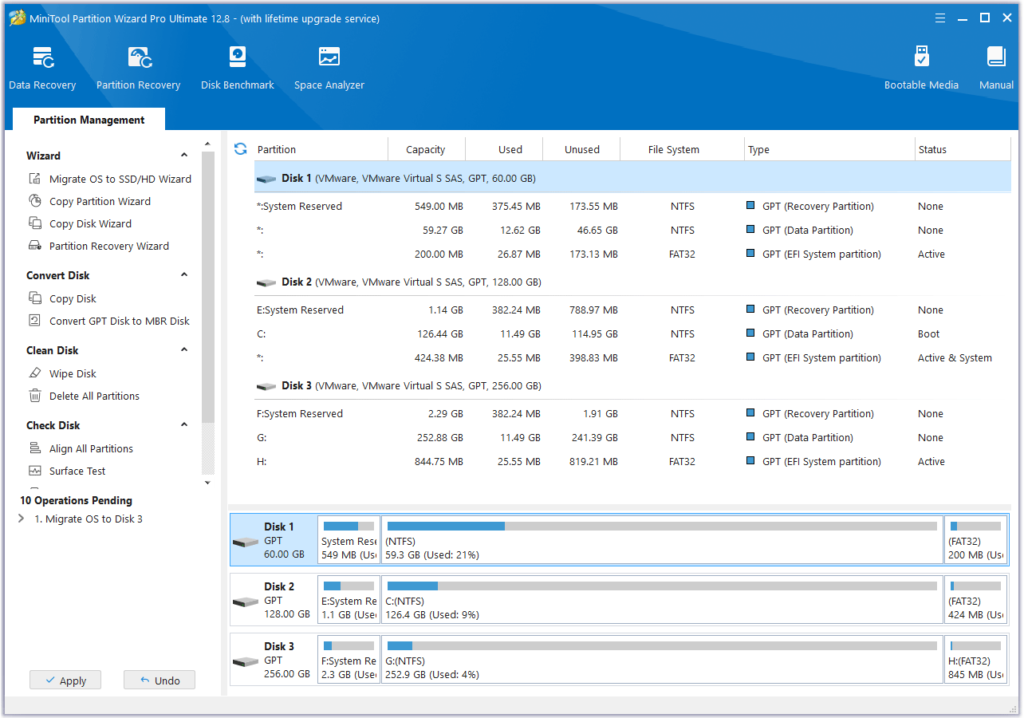
If you need to perform any of these advanced tasks, then you will need to upgrade to the paid version of MiniTool Partition Wizard. However, the free version is more than sufficient for most users.
Conclusion
MiniTool Partition Wizard 12.8 is a great disk partitioning tool for Windows users. It is free, easy to use, and offers a wide range of features and functions. If you are looking for a way to effectively manage your disk partitions, then I highly recommend MiniTool Partition Wizard 12.8.