
If you have folders that you always want to synchronize with each other in practice, Alternate File Move is worth a look.
By: Dennis Gandasoebrata
The program ensures that two pre-designated folders are always synchronized, while using a minimum of system resources. The program is open source and can be used for free.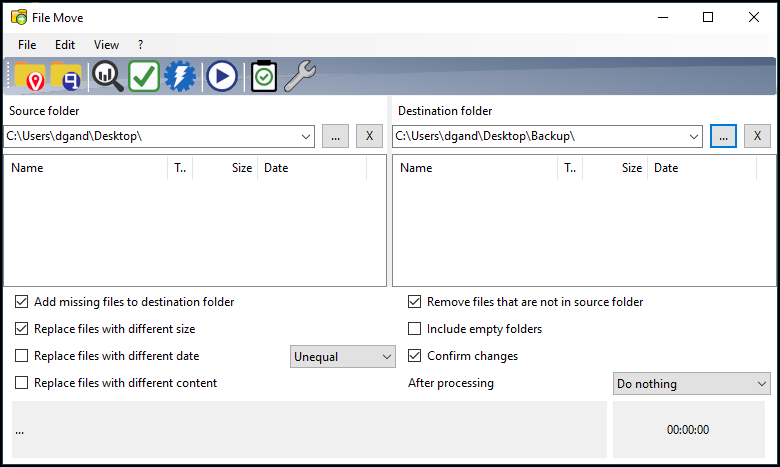
To ensure an exact copy of the directories, the software looks at several variables. For example, files can be compared in terms of size, but also by date and content (at the byte level). The program window is made up of two parts. On the left you define the source folder, on the right the destination folder is shown. At the bottom we find additional options with which you can further adjust the synchronization to your liking. For example, you can indicate that empty folders are also copied to the destination folder. It is wise to analyze each action in advance. This way you can see what will happen when the action is performed, without this actually happening. If you are satisfied, you can actually make the changes. Handy is the option to save the user settings, so that you can also apply them to other sync pairs.
Product: Altenate File Movealternate-tools.com/pages/c_filemove.php?lang=ENG


System Requirements: Windows
Pros:
* clear user environment
* analysis prior to execution
* save user settings
Cons:
* no support for multiple sync pairs at the same time