
You can “upgrade” the dark mode functionality in Windows 11 with some outside help.
The creator of Auto Dark Mode has created an app that allows you to set more variables of the built-in feature
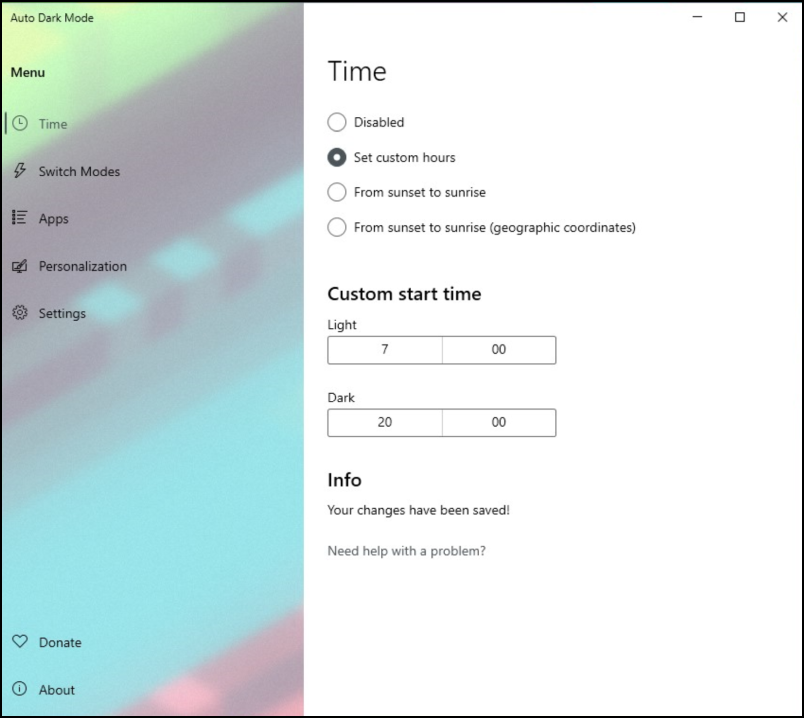
Dark mode normally needs to be turned on and off manually in Windows 11. With Auto Dark Mode you can activate the mode based on time. For example, you can choose to use self-set hours for the light and dark mode, but you can also have the setting depend on sunrise and sunset. In a separate section – Applications – you also determine whether dark mode should also be applied to the individual apps and whether specific parts – such as the Windows taskbar – can retain a fixed accent color, regardless of whether a dark mode is activated.
You can make the same distinction for Microsoft Office, if installed. Here you can, for example, choose to always use a light theme. You can let the mode depend on specific conditions. So you can go through the section Switch Modes set not to switch between modes while playing a game or to activate dark mode when the laptop is running on battery power.
You can use the compact program for free. If you like it, a donation to the creator is appreciated.

Product: Auto Dark Modedownload from Microsoft Store
Platform: Windows
Pros:
* Automate dark mode
* Differentiation between system and apps
* Exclude specific Windows components
Negatives:
* Not compatible with Windows 10