
With the arrival of the latest iPhone, Apple introduced the so-called Dynamic Island.
Dennis Gandasubrata
The traditional cut-out at the top of the screen is expanded with a notification function. If you’re an Android user and envious of that Apple gimmick, you can take a look at DynamicSpot. You guessed it: with this app you have a similar island on your Android device. You can use the app for free.
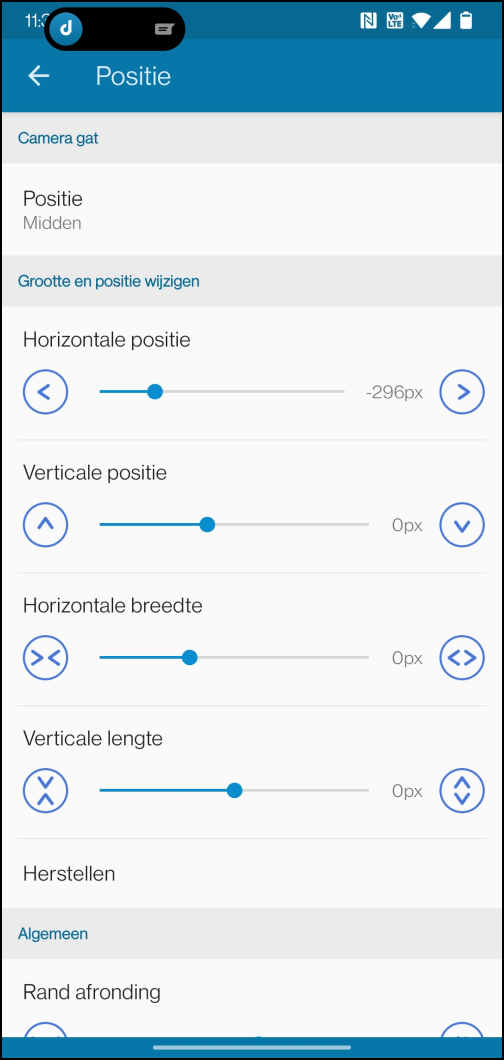
Every Android phone is different. When setting up the app, you determine the location of the island on your device. You can not only determine the position, but also the dimensions of the beam. Of course you also indicate which apps are given a place on the island and are allowed to show notifications. If you don’t feel like making a selection here, you can also choose to allow all apps for the island at once. Once set, the notifications will appear in the island.
You have several options for this. If you long tap on the notification, the pop-up window will enlarge and you can read the full message. This is useful, for example, when reading incoming WhatsApp messages, but also when you play music and want quick access to the player’s control buttons. If it is a text message, you can also reply to the message directly from the pop-up window.
Product: Dynamic Spot (via Google Play)

Price: Free
System Requirements: Android
Language: English