
FastCopy proves that some programs are compact and very handy.
By: Dennis Gandasoebrata
The makers themselves call their software ‘the fastest copy and backup software for Windows’. We have not checked that claim, but the fact is that the program is useful for anyone who regularly copies (large) files. The software has been around for quite a few years, but also works well in Windows 11. You can use FastCopy for free and the makers ask you to make a donation if you like it.
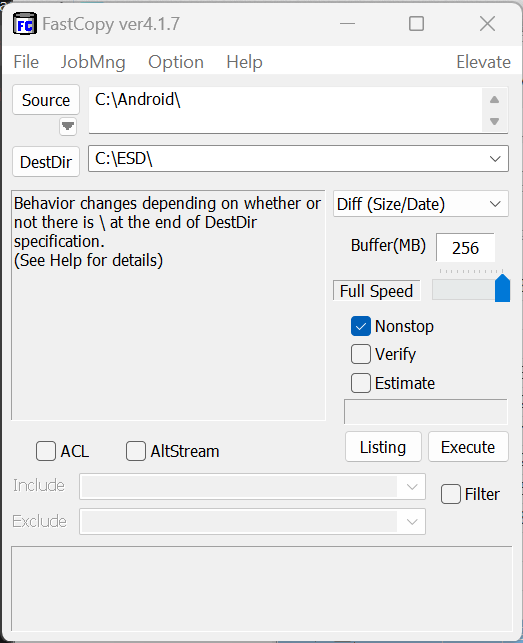
FastCopy consists of one window in which you handle all copy actions. You first choose the source file or folder and then indicate in the box below where the files should end up. You can determine the final copy speed via a simple slider on the right of the screen. Under the hood, that speed is primarily determined by the size of the file buffer claimed by FastCopy. Although the app doesn’t offer many additional options, we would have liked a little more text and explanation for how it works, so that you can quickly assess whether you want to switch an additional parameter on or off during the action. The program also offers a simple filter, with which you can explicitly exclude files from a copy action: useful if you want to copy a folder in one go, but do not want to take all files with you to the new location.
Product: FastCopy https://fastcopy.jp

Platform: Windows
Pros:
* Compact program
* Customizable copy speed
* Available in ‘portable’ version
Cons:
* Summary text and explanation