Samsung is making useful features of the latest Galaxy Z Fold5, Z Flip5, Tab S9 series and the Watch6 series available on previous Galaxy devices. The update aims to bring greater convenience to more users.

Samsung is making some features of the latest version of One UI available on previous generations of devices (1) via a new update. This major release aims to improve the Galaxy ecosystem and bring users more convenience to mobile productivity and entertainment. The update will bring key innovations of the Galaxy Z Fold5, Z Flip5, Tab S9 series and Watch6 series to more users worldwide.

To provide users with an enhanced device experience, the One UI 5.1.1 software update will be available this month on Galaxy Z Fold4 and Z Flip4 devices, followed by the Z Fold3, Z Flip3, Z Fold2, and Z Flip successively. received update. Users of the Galaxy Tab S8, Tab S8+, Tab S8 Ultra, Tab S7, Tab S7+, Tab S7 FE, Tab S6 Lite, Tab A8, Tab A7 Lite, Tab Active 3 and Tab Active 4 Pro will soon also be able to enjoy several new , user-facing functionalities as part of the One UI 5.1.1 update. In addition, Galaxy Watch5, Watch5 Pro, Watch4 and Watch4 Classic users will receive important updates through the One UI 5 Watch update.

Open up new ways to interact with your device

One UI 5.1.1 makes it easier for Galaxy Z Flip4 and Z Fold4 users to enjoy their favorite media and content with Flex Mod (2), thanks to a range of enhanced features and functionality. This upgrade makes it easier to show or hide the Flex Mode Panel. When you fold the phone in Flex Mode, the Panel icon moves up the screen for easy access. You can get a more personalized Flex Mode Panel experience by simply dragging and dropping the icon on the toolbar. This customizable panel gives users easy access to features like Multi Window3 , touchpad, screen recording and more.

With the new update, the media play bar button – complete with 10 second fast forward, rewind and access to functionalities – is shown in one convenient place when the Flex Mode Panel is activated. You can also press down to more easily navigate through your media with the progress bar. When watching movies in Flex Mode, you can get the most out of your favorite content by rewinding or fast-forwarding with just one tap of your personalized Flex Mode Panel Tool Bar. Or open a new Multi Window (3) to reply to a message or browse reviews online, all without interrupting your viewing.

Multitasking makes it easier for you

The multitasking experience for foldable devices and tablets will also improve with the new update.

1. While watching a video on your Galaxy Z Fold4, Z Flip4 or Tab S8, you can easily access Samsung Internet in a pop-up window to search for something without interrupting playback. When you’re done browsing, the window can simply be dragged to the edge of the screen, where it clicks into place. If you want to access Samsung Internet again, simply tap the pop-up to open the window in the previous location.

2. Intuitively switch from the pop-up window to Multi Window by pressing and holding the handle at the top of the pop-up window. The new update supports opening and operating the screen effortlessly: you can easily switch to split view and control your screen simply by pressing the pop-up view handle a little longer.

3. Two-handed drag-and-drop (4) is now supported on the main screen of your foldable device and on your tablet, so you can open the desired app with one hand and then drag a file, app icon, or other item with the other hand. drag the destination folder or location. With this update, you can share multiple photos from your gallery with friends via a messaging app even faster.

4. With innovative additions to the Taskbar (5), Galaxy Z Fold4 and Tab S8 users can unlock next-level productivity for both work and play with this new update. The Taskbar5 now enables lightning-fast task switching, with access to up to four recent apps.

Take your Health Coach to the next level and show who you are with the Galaxy Watch (6)

With the One UI 5 Watch update, more personalized wellness features (7) will be available on the Galaxy Watch5 and Watch4 series, designed to help you achieve better health. There are also more customizable style options to fit your lifestyle perfectly.

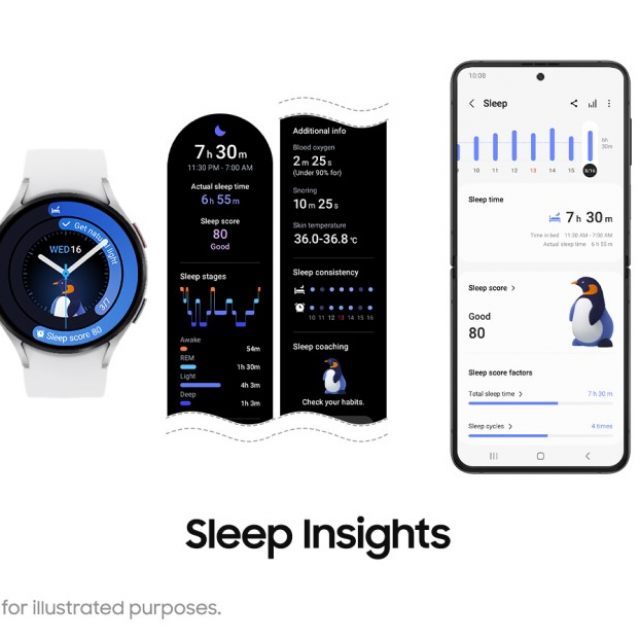
5. With the improved sleep analysis (8), users can better understand their personal sleep patterns. They feature a more intuitive user interface with a detailed analysis of sleep score factors (9), sleep consistency and sleep types (10). Users can also access sleep coaching right from their wrist, making it easier to track their progress and stay motivated throughout the day.

6. Furthermore, maintaining a sleep-friendly environment is important for a good night’s sleep. When it’s time for bed, the Galaxy Watch can help set the optimal sleep environment by automatically adjusting the settings of connected home devices (11). In addition, when sleep mode is enabled, the invisible LED infrared sensor on the watch is activated to minimize even the smallest distractions.

7. With the One UI 5 Watch update, you have personalized fitness tools at your disposal to help you set – and achieve – your own fitness goals. The Personalized Heart Rate Zone functionality analyzes your physical capabilities (12) and determines five optimal intensity levels for running. And in addition to the 100+ existing workout trackers, you can now record your track runs with Track Run and even build and track your own workout routine with the Custom Workout functionality.

8. For Galaxy Watch5 Pro users, even more enhanced GPX functionalities (13) are available. Users can now more easily explore new routes via the GPX File Database (14). In addition, you can easily search and download various GPX route files in your area. The Route Workout functionality has been expanded to support running and walking in addition to hiking and cycling.

9. In addition, Galaxy Watch5 and Watch4 users will have access to an even greater selection of stylish and informative watch faces (15) that suit their style and goals very well. This fall, Galaxy Watch Active2 and Galaxy Watch3 users will also be able to enjoy some of these new watch faces – Stretched time and Perpetual – to express their own style.

Improved Galaxy Ecosystem Experience (16)

The latest One UI update optimizes smartphone camera operation. With the addition of a dedicated quick access button on the Galaxy Watch, it’s even easier to control the camera of your paired Galaxy Z Flip4 remotely, right from your wrist. You can easily switch between camera modes and even zoom in or out.

(1) “Earlier Generations of Devices” refers to the models released before the release of the Galaxy Z Fold5, Z Flip5, Tab S9 and Watch6 series. The One UI update is supported on the following generations of devices as follows: Galaxy Z Fold: Z Fold4, Z Fold3 and Z Fold2 models. Galaxy Z Flip: Z Flip4, Z Flip3 and Z Flip. Galaxy Tab: Tab S8, Tab S8+, Tab S8 Ultra, Tab S7, Tab S7+, Tab S7 FE, Tab S6 Lite, Tab A8, Tab A7 Lite, Tab Active 3 and Tab Active 4 Pro. Galaxy Watch: Watch5, Watch5 Pro, Watch4 and Watch4 Classic. The software update will be available first for the Galaxy Z Fold4, Z Flip4, Tab S8 series and Watch5 series and will be available sequentially for previous generations.

(2) Flex Mode is supported in angles between 75° and 115°.

(3) Certain applications may not support Multi Window or App Pair.

(4) Certain applications may not support two-handed drag and drop.

(5) Taskbar functionality is only supported on the main screen.

(6) Availability and support of features may vary by market, carrier and model.

(7) Intended for general wellness and fitness purposes only. Not intended for use in the detection, diagnosis, treatment, monitoring or management of any medical condition or disease. Any health-related information accessed through the device and/or its applications should not be considered medical advice. Users should seek medical advice from a physician. Certain functionalities may vary by market, carrier or the paired device.

(8) Sleep functions are for general wellness and fitness purposes only. The measurements are for personal reference only. Consult a medical professional for advice.

(9) Displayed on a paired smartphone.

(10) Requires a minimum of seven days of sleep data, including two days off.

(11) Available on smart devices registered with SmartThings. Requires the latest version of the Samsung Clock and SmartThings mobile apps.

(12)]To update the range of each running heart rate zone based on cardiopulmonary capabilities, the user must run outdoors for more than ten minutes at a steady pace of 4km/h or faster.

(13) The GPS function requires an internet connection. Can be used on LTE models without a paired smartphone. Non-LTE models require a Bluetooth connection to their paired smartphone.

(14) The features are supported through the Samsung Health mobile app.

(15) Availability may vary by market or model.

(16) Availability may vary by market, model and connected devices.