
With sleep score in watchOS 26 you get insight into the quality of your night’s sleep at a glance. Based on various factors, such as sleep duration, heart rate, breathing and wrist temperature, your Apple Watch calculates a score that shows how well you slept. This way you can quickly see whether your sleep was restful enough and where you can make improvements.
After all, a good night’s sleep is essential for your health and helps with daily recovery. The Apple Watch therefore accurately tracks your sleep patterns and measures important data such as heart rate, breathing and temperature at night.
Sleep score for Apple Watch
You can view your sleep score every morning in the Sleep app on Apple Watch and the Health app for iPhone. This helps you improve your sleep. You have quick access to your score via a complication on your watch or the Smart Stack. Do you want a detailed overview? You can also keep track of your scores over a longer period in the Health app on your iPhone or iPad.
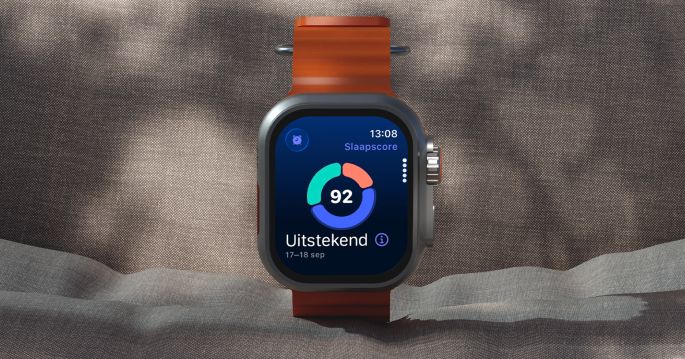
Sleep score calculation
The score is calculated based on various data that the Apple Watch collects during the night.
- Sleep duration: How long you slept.
- Consistency of your bedtime: How regularly you go to bed.
- Sleep interruptions: How often and how long you have been awake.
- Sleep stages: How long you spent in light sleep, REM sleep and deep sleep.
- Movement data: How active you were during your sleep
- Heart rate and wrist temperature (for supported models)
The score is divided into three categories, with a total of 100 points possible:
- Duration: maximum 50 points
- Bedtime: maximum 30 points
- Interruptions: maximum 20 points
By adding up the points, you get an assessment that is reflected in your sleep results. The sleep score ultimately gives the result: Very Low: 0-40, Low: 41-60, Okay: 61-80, High: 81-95 and Very High: 96-100.
View sleep score
- Open the Sleep app on your Apple Watch
- View the first page in the app
- Open the Health app on your iPhone
- Tap the search field (magnifying glass)
- Go to ‘Sleep’
- Tap ‘Sleep Score’

In addition, you can also view the sleep score directly without opening the Sleep app. In watchOS you add this as a complication on your watch face or as a widget in the smart stack. This way you can see at a glance how well you slept as soon as you lift your wrist or scroll through the smart stack, useful for continuing to monitor your sleep quality throughout the day.
Sleep score availability
The Sleep Score feature is available on all Apple Watch Ultra models, Apple Watch SE 2nd generation or later, and Apple Watch Series 6 or later. To use it, your Apple Watch must have watchOS 26 or newer and your iPhone must support iOS 26.