
Recently there are a number of new functions in WhatsApp. For example, you can now add a caption to a document, send a maximum of 100 photos and videos at a time, create longer group names and group descriptions, and video calling has been greatly improved.
Chat app WhatsApp regularly releases updates to make WhatsApp better and easier. New updates have recently appeared in the Google Play Store and Apple’s App Store and in this article you can read which improvements these are.
Document caption and 100 photos and videos
You could already add a caption when sending a photo or video and you can now also add a caption to a document. Very handy, then the recipient immediately knows what it is about thanks to the caption. Also useful is that you can now send up to 100 photos and videos at a time to someone or in a group. Until now, that was only 30 photos and videos at a time. If you send 4 or more photos or videos at a time, they will still be bundled in an album of 4 fields and the last field will contain a number with the rest of the photos and videos. Otherwise, of course, you will end up with your entire window full of photos and videos.
Group name longer and schedule video call
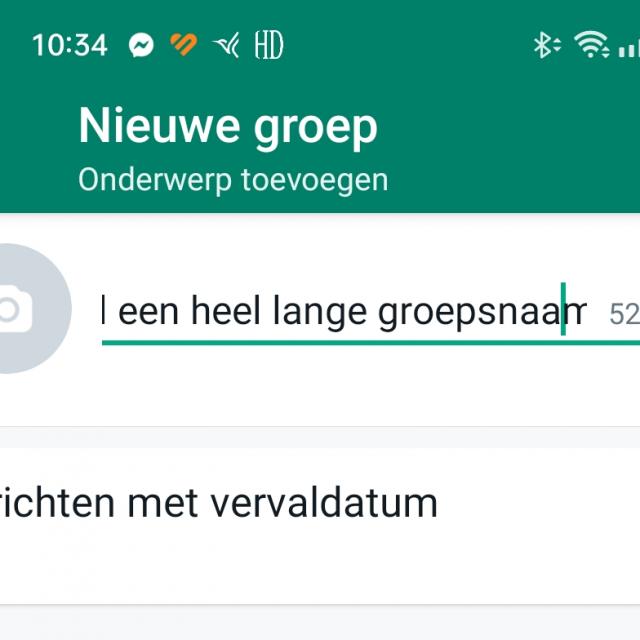
Many WhatsApp users are often in one or more groups. Such a name of a group can now become longer, namely 100 characters. If you enter a name, you will see how many characters you can still use on the right side. A longer and therefore often better group description is now also possible.
Incidentally, WhatsApp is working on a function for scheduling video calls and linking them to a date and time, as you already see with Google Meet, for example. Namely, in the WhatsApp beta is the inactive function Schedule call option appeared; just before the meeting starts, the group members also receive a reminder.
Video calling improved: picture in picture
The last new feature at WhatsApp is video calling. You no longer need to have the app fully open while you are making video calls. If you are video calling with WhatsApp, you can close WhatsApp and you will see a window appear in a corner in your video call. So you can easily look up something on your smartphone while still seeing the image of video calling. In other words, picture in picture as it is also known from the TV and it has also been with Apple’s Facetime since iOS 14. Until now, this was not possible with Android smartphones: if you opened another app during video calling via WhatsApp, the image was paused.
From now on, we will keep you informed every week about new features and messages about WhatsApp.