
The necessary programs are now available for managing (extensive) music collections, but some apps still stand out in a positive way. The same goes for TagScanner.
By: Dennis Gandasoebrata
With the software, the makers focus on keeping track of your music and, above all, keeping it organized. The basis is formed by tags: tags that specify the characteristics of the music. 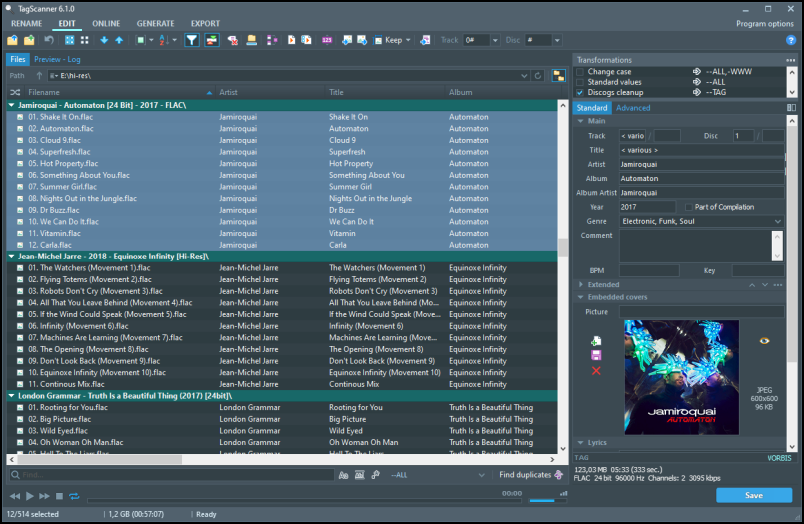
On the left side of the window you will find the actual collection, while the panel on the right is where you keep track of the meta information about each song. For example, you can specify general characteristics, such as title, artist and year of release, but also add album art and specify additional characteristics (such as BPM). If you are not satisfied with the standard fields, you can define additional fields. We also find this flexibility in other places in the program: for example, you can use standard music genres when sorting, but you can also create your own genres. Handy is the option Find Duplicateswith which you can search for duplicate (and therefore unnecessary) tracks within the collection.
You can assign the aforementioned tags yourself per song, but you can also have tags automatically determined based on existing information, such as the file name. You can also import tags from a text file. You can eventually also export existing collection data for use in other programs. TagScanner supports various formats for this, including HTML, XML and CSV.

Product: TagScannerxdlab.ru/en/index.htm

System Requirements: Windows
Pros:
* automatic labeling
* automatic labeling
* extended export function
* create your own genres
Cons:
* advanced options not always intuitive