

Change the messaging app settings to limit who can see your phone number.
If Telegram requires your phone number to register, and then to find contacts in your address book that you can contact, then it is no longer necessary to use the application and send messages. To ensure that no one can access it, it is therefore better to modify certain parameters of the application to restrict access.
And if you’re worried that your future contacts won’t be able to find you in the future, don’t worry. Telegram basically asked you when registering to fill out your profile and choose a username. This identifier can replace your mobile number to be identified on the platform. It will therefore always be possible to find and add you by looking for it directly in the centralized directory.
Download Telegram for Android (apk) (Free)
Download Telegram for iPhone (Free)
1. Open Settings
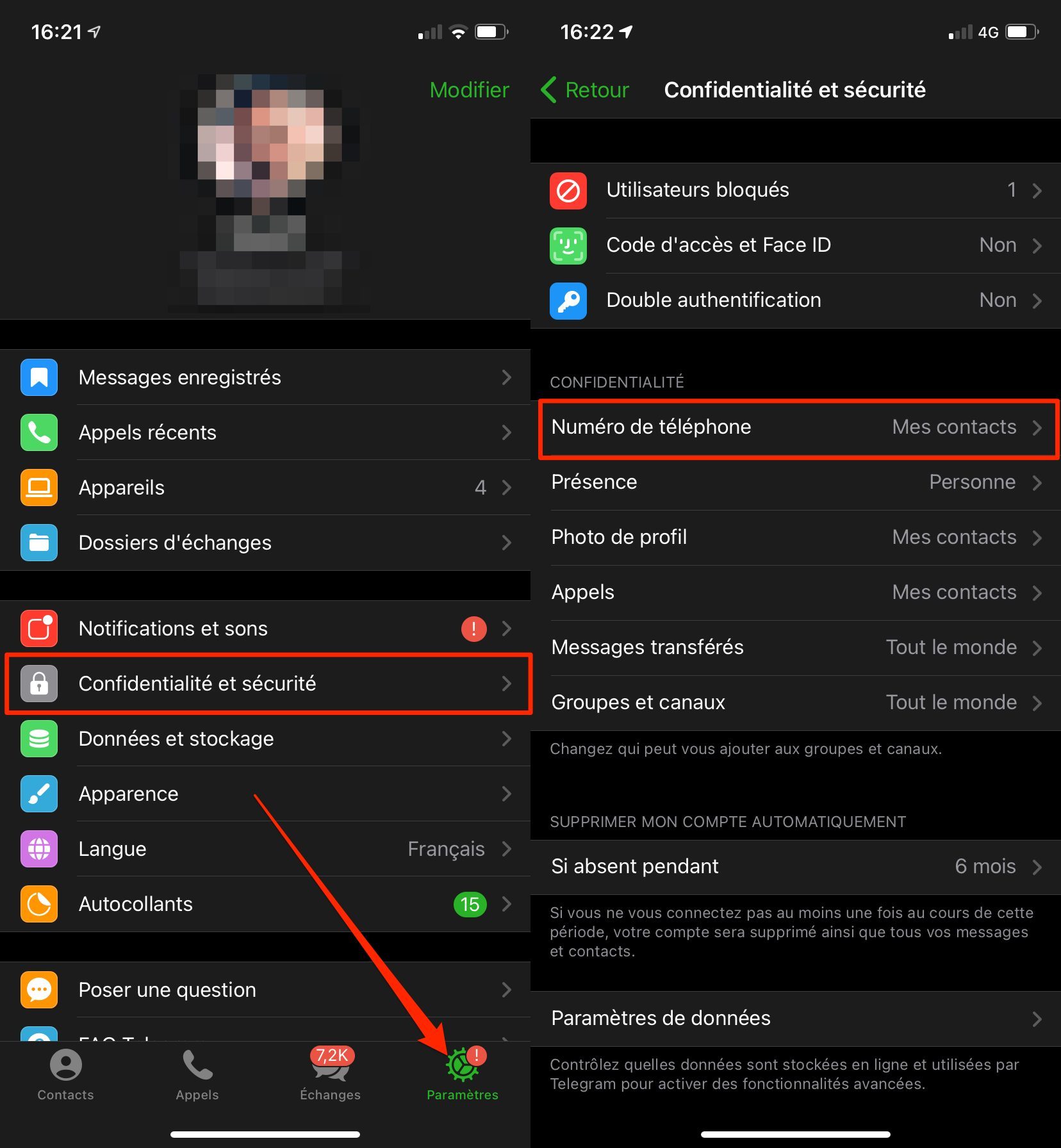
Start by accessing the Settings of the application by accessing the dedicated section on iOS, and deploying the main menu of the application on Android. Then go to Privacy and Security options.
2. Hide the number
Then enter the Phone number menu, and change the Who can see my number option. Depending on the privacy you want, choose My contacts, or Nobody if you don’t want your number to be visible to any user.

It is one of these two options that you will have to choose if you want to use the incognito application, especially if you participate in public discussion groups. It will be possible, if necessary, to add exceptions to this rule. You can indicate that the number is never visible for certain contacts, or on the contrary that it is always visible for others.