

© Gmail
A group of researchers has discovered new malware used by North Korean hackers to read and download Gmail users’ emails and attachments.
Hackers do not lack imagination to access our personal data. Today, it is Korean hackers who have distinguished themselves by the ingenuity they have shown in bypassing Google’s security methods and thus reading their victims’ emails on Gmail.
How Do Hackers Bypass Gmail Security?
It was security researchers from the company Volexity who found this malware nicknamed SHARPEXT which installs, without the knowledge of Internet users, an extension on Chrome and Edge browsers. You can imagine that this extension is not present on the Chrome Web Store or the official Microsoft download platform. It is all the more sneaky as it allows you to bypass the most popular security means such as a good password and the activation of double authentication to access your online accounts.
The malware has been circulating for more than a year, according to the researchers. It is said to be the work of a group of North Korean hackers, sponsored by the government to largely target American, European and South Korean organizations that work on nuclear weapons and other issues that the Kim Jong regime -a judge important to the national security of his country.
We also learn that the malware in question only targets Windows PCs, but that hackers would have no trouble porting it to other platforms such as macOS or Linux. On its blog post, the company Volexity indicates that the logs they obtained “show that the attacker managed to steal thousands of emails from several victims thanks to the deployment of the malware”.
A well-established process
To achieve their ends, hackers often use the phishing method. The victim is tricked into opening a malicious document that they received. The software then installs an extension in the user’s browser without the user noticing. A more complex process than it seems. This is because Chromium web browser security prevents malware from changing sensitive user settings.
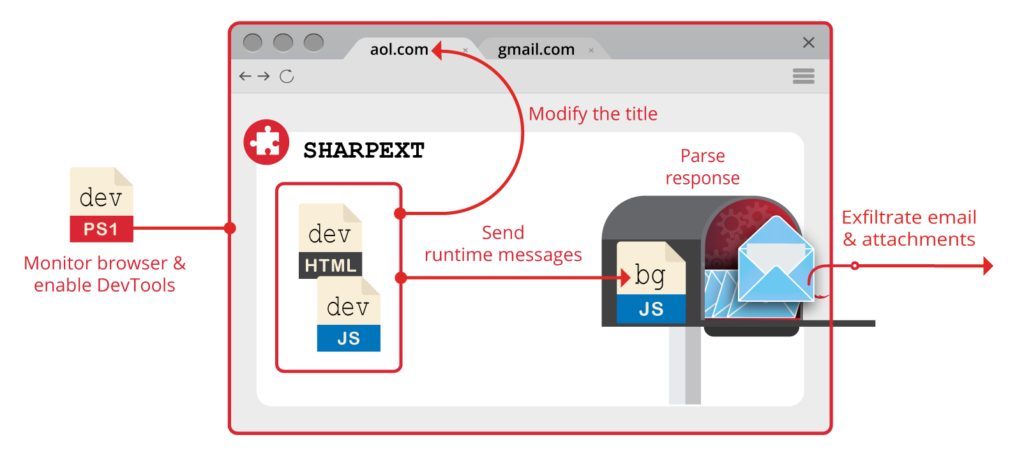
Hackers therefore had to use an alternate process that first involves modifying system preference files, then installing the browser extension and running a Powershell script that activates DevTools developer tools to allow the malware to run custom code and settings directly in web browsers. The Volexity researchers point out:
“The script runs in an infinite loop that checks processes associated with targeted browsers. If targeted browsers are running, the script checks the tab title for a specific keyword like 05101190 or Tab+. The specific keyword is inserted into the title by the malicious extension when an active tab changes or when a page is loaded. »
From there, the script that runs is able to suck up all the data from a page, like emails from your Gmail account for example. The SHARPNEXT malware is also capable of creating email ignore lists and keeping track of already stolen ones or even attachments.
As this malware is still in circulation, you are advised to be extra careful, especially when clicking on attachments from dubious senders. Also be sure to update your browser or use more secure operating systems like ChromeOS.
lemon squeezer