
Apple has secretly added something useful to screenshots in iOS 26. Your iPhone recognizes web addresses and makes them immediately clickable. This is how it works!
iOS 26 has a secret feature for your screenshots: here’s how to use it
iOS 26 includes a useful function for taking screenshots. This feature can automatically make a web address clickable, eliminating the need to paste and copy the URL (if that’s even possible).

This function can be useful for Instagram, among other things. Instagram does not allow the use of links in descriptions or in the comments. Simply copying and pasting a link is often not always easy.
Apple quietly added a useful feature for this in iOS 26. This feature is part of Apple Intelligence. When you take a screenshot and it contains a web address, your iPhone automatically scans what is shown on the screen. Does iOS 26 see the URL? He will then immediately create a link that you can click on.
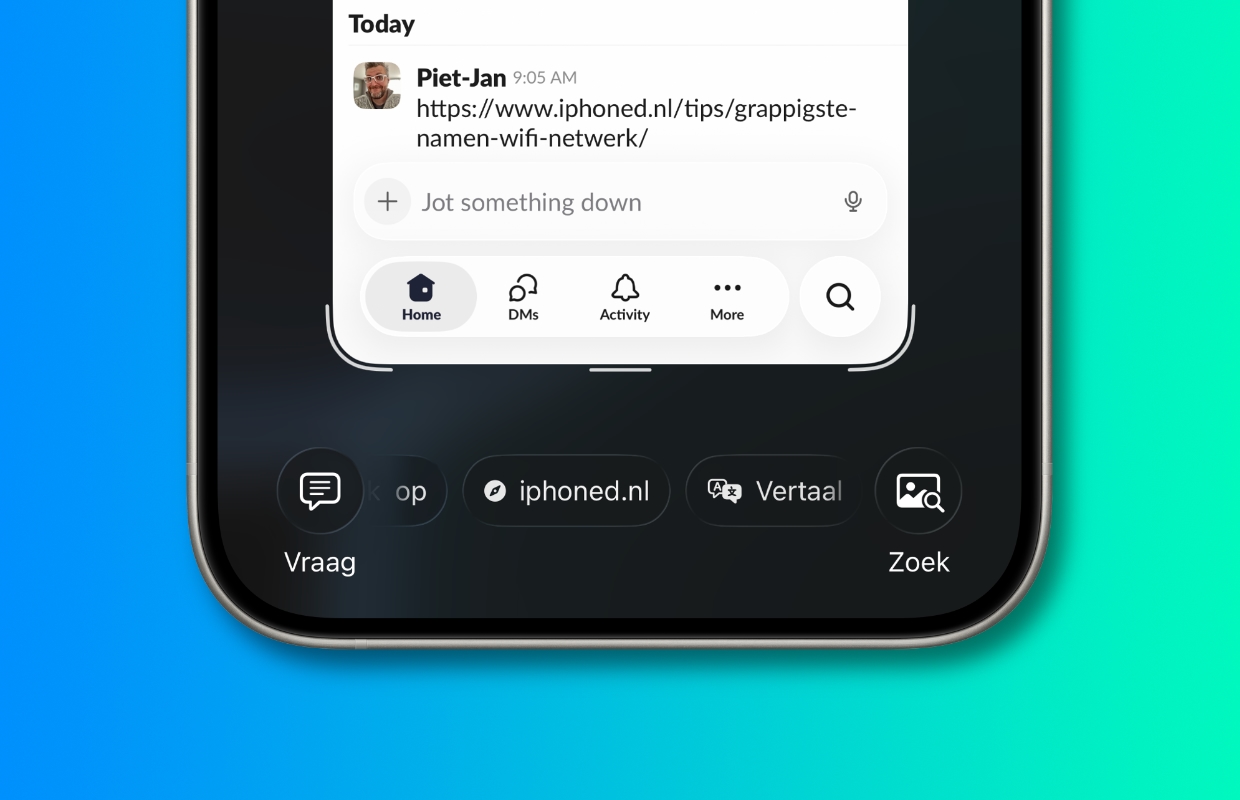
To use the function, first take a screenshot as you always do. In iOS 26, by default, you will then see a preview of your captured screenshots. At the bottom you can then swipe through different options. Scroll through the different options and tap the link your iPhone created and the websites will open.
Have you ever set screenshots to only appear as a small thumbnail at the very bottom (like in older iOS versions)? You must then first tap on that thumbnail to open the full preview, after which the link will become visible.
By the way, this screenshots feature only works on iPhones with iOS 26 that support Apple’s AI features. These are recent models such as the iPhone 17 and iPhone 16 series. The function also works on an iPhone 15 Pro (Max) or an iPhone 16e.
More iPhone tips
-
iOS 26 has a secret feature for your screenshots: here’s how to use it
-
What should you pay attention to with a business iPhone subscription?
-
Beware: new form of scam via iDeal – this way you stay safe
-
iPhone tips: 4 settings you need to adjust immediately in iOS 26!
-
This secret iPhone button has been hidden for 9 years (but here’s how to activate it)
-
Turn off “Download and Save Originals” to save space
-
This way you prevent apps on your smartphone from (secretly) listening in on you
-
You must enable this iPhone feature every day (for this benefit)
-
iOS 26 still causes major problems on iPhones – here’s how to fix it
-
Spotify has a new smart function (and it is already indispensable)