
If you regularly use ChatGPT, the chatbot probably knows a lot more about you than you think. This way you prevent ChatGPT from using all the data!
ChatGPT guesses your age
ChatGPT has a new feature! OpenAI regularly makes improvements to the chatbot. That is now the case again, because ChatGPT can now guess your age. Do you use ChatGPT regularly? Then simply ask the question “How old do you estimate my age to be?” to get an estimate of your age. ChatGPT then provides an indication of your age, based on information that the chatbot has collected about you.
ChatGPT’s new feature is now available to all users. It turns out that the chatbot can generally estimate ages well. That’s not surprising, because ChatGPT knows a lot more about you than you might know. To guess your age, ChatGPT uses all information collected in previous conversations. Do you want to prevent that? Then disable the following features in ChatGPT.
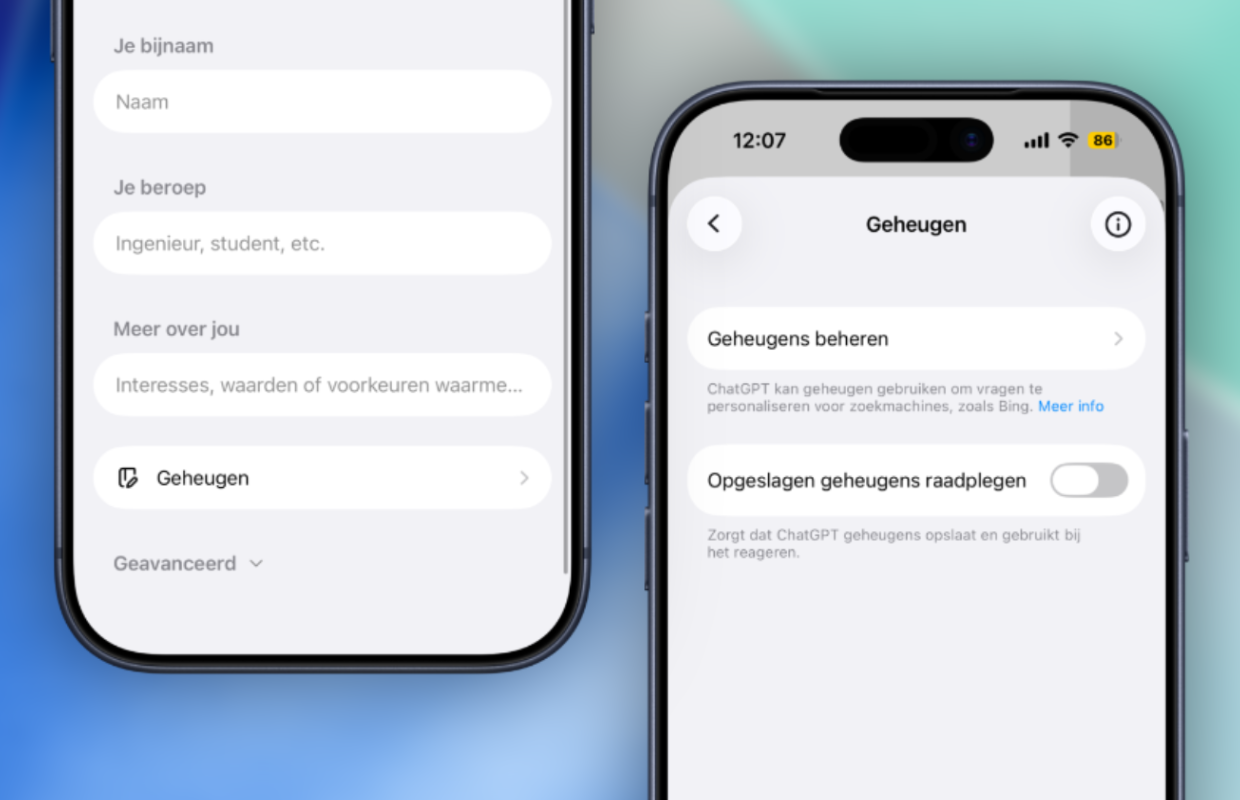
This is how you prevent that
To guess your age, ChatGPT uses all the data you have ever entered into the chatbot. ChatGPT collects information about you based on your writing style and entered assignments. This data is stored and can be used by ChatGPT at a later time when you start a new chat. This way, ChatGPT knows a lot more about you than you think, because all the information you enter is stored and reused. Do you want to prevent the latter? Then turn off the following settings:
- Open ChatGPT on your smartphone or desktop;
- Open the sidebar and tap your name;
- Go to ‘Personalization’;
- Choose ‘Memory’;
- Turn off the switch behind ‘Consult saved memories’.
Have you disabled the ChatGPT feature? The chatbot will then no longer use recent conversations when responding to new questions. In addition, you prevent ChatGPT from saving and using memories when responding to new commands. With these features disabled, ChatGPT knows much less about you, because the chatbot no longer has access to previous conversations.

More about ChatGPT
Please note, because ChatGPT can no longer take your personal context into account if you have disabled these functions. That also has disadvantages, in some cases you have to provide more explanation so that ChatGPT understands you better. The chatbot can no longer consult previous conversations and therefore needs more information from one conversation. The advantage is that you decide for yourself which data ChatGPT has access to at that moment.
Do you want ChatGPT to know even less about you? Then you can also start a temporary chat with the chatbot. With a temporary conversation, the information is not stored in your history, data is not used for model training, and ChatGPT does not update memories. You start a temporary chat in ChatGPT by starting a new conversation and tapping the striped text field at the top right. In this mode, ChatGPT does not store any information you share in the conversation.
It remains important that you do not share sensitive information with chatbots such as ChatGPT. Keep information about your finances, health, bank account and login details to yourself, even when you use the temporary chat. This way you can be sure that this sensitive information will not be involved in a possible data breach. Did you find this tip useful and would you like to know more? Then sign up for our daily or weekly newsletter!

Download the iPhoned app
