
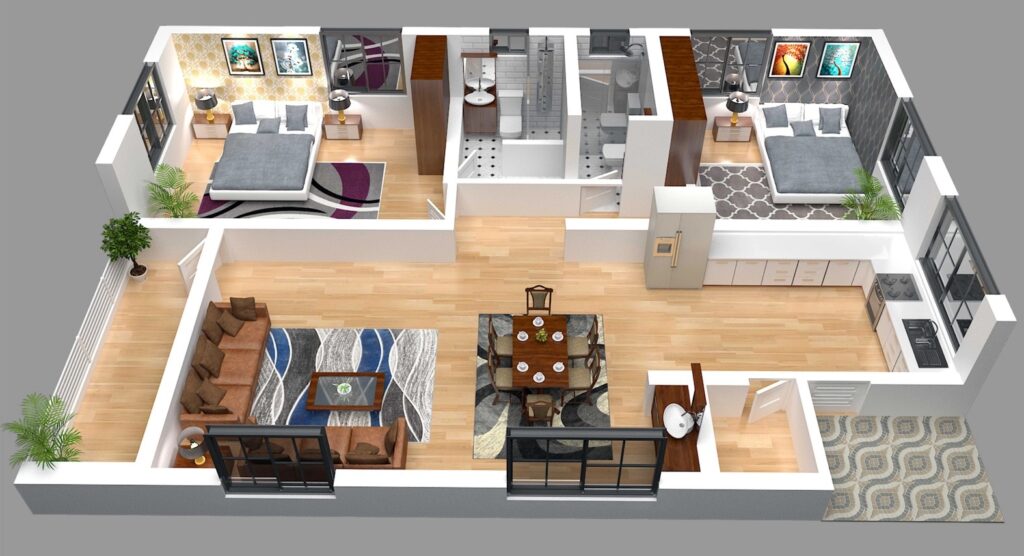
Floor planning software is used for preparing floor plans and 3D renders of your apartment, house or office. Its crucial benefit is a chance to analyze the displayed space in detail and improve its convenience, color scheme and other parameters before the plan is implemented into reality. Such tools are lifesaving whenever you need to check the position of decoration items and try out important design elements like furniture or light sources.

Using professional floor planners like the Live Home 3D app kills two birds with one stone. It helps you prevent issues and difficulties in the upcoming project stages. At the same time, it makes the process more experimental, enabling you to come up with the best visual and functional version in a few clicks.
How to Choose the Best Floor Planner
The programs, which assist you with the floor plan creation, will also visualize your interior design. The projects are simple to navigate and understand for a non-pro person. It is possible to create interiors literally in the twinkle of an eye, and here are the main choice criteria to be satisfied with your dedicated software:
- Hardware and system requirements — take into account what devices and operating system versions the app supports. For instance, Live Home 3D will work great on iPads and iPhones with iPadOS or iOS 13 and higher; devices with Windows 10 or later installed; Mac computers with macOS 10.14.6 or higher. The more platforms and devices are supported, the better.
- Pricing — free programs are simple to check and use, but the variety of features is frequently severely restricted. Live Home 3D is a great option since it allows trying it out without extra charges.
- Demo & training — pay attention to the number of video tutorials the app offers. Live Home 3D offers 30 video tutorials for each platform on its website, and this number is constantly growing. You can also get inspired by looking at the samples of ready-made projects on the app’s social channels: Instagram — @livehome3dapp or Facebook https://www.facebook.com/livehome3d/. It is pretty motivational, isn’t it?
- Advanced features — floor planners with something more than 2D functionality are heavily sought-after. AR walk-throughs, panoramas and VR videos make Live Home 3D stand out among other apps.

Editor’s Choice: Multi-functional Live Home 3D
It is an awesome sample of a user-friendly application that caters to customers’ interests from different perspectives. First and foremost, this software is compatible with numerous platforms like Mac, Windows, iPad and iPhone. This enables you to work on the go and add adjustments to your projects anywhere and anytime — its tools are always at your disposal.
Furthermore, the highlighted technological product for architects and designers has a plethora of premium features:
- Like any remarkable floor planner in the modern market, Live Home 3D has several pre-made templates in its gallery. You can open the sample rooms and check how to design a small room that needs more light, traditional or high-end kitchens, corner bathrooms, art deco, retro or other styles of living spaces.
- Based on the information from templates or your knowledge, users can create a floor plan from scratch. There are several tools to diversify your canvas, adding dimensions to walls and specifying the location of main furniture elements like a bed in the bedroom or a sofa in the living room.
- Select the 2D mode to see how to customize your plan. Each room might be tinted in a different shade to achieve a more artistic and vivid appearance. Customized labels with educational content will aid in providing more details about the room’s function.
- When you switch to the 3D view in the program, you are enabled to work on the interior and exterior in more detail, adding decorations, greenery spots and so on. That is when you work on the layout’s textures and surfaces. This process lets enthusiasts visualize what the room will look like after the project is finished. You can import your pieces of furniture and decorations as your favorites and get the most from more than four thousand materials and objects available in the built-in library of Live Home 3D.
Wrap It Up
To cut the long story short, it is worth mentioning another feature that will draw your attention to Live Home 3D — it allows users to view the project in AR (augmented reality) and VR (virtual reality), letting users walk through their three-dimensional plans in a video-like format. Whether you work on iPhone, Mac or Windows, it remains a multifunctional program for any of your devices.