
Looking back at photos has become a lot more fun in iOS 26. Your iPhone now shows the set list and future performances of the band at concerts. This is how it works!
This hidden iPhone feature makes the Photos app much smarter
Apple has done a lot of tinkering with the Photos app in iOS 26. During WWDC 2025, the company already showed that the ‘all-on-one-page’ layout has been rolled back a year and the familiar tab bar is back. You can also now create ‘spatial scenes’ from existing photos in iOS 26. This gives them a little more depth and even looks truly 3D.
But there is a secretly useful function in the Photos app that is easy to overlook. The app can now recognize different events. This includes, for example, concerts or sports competitions and other busy events of which you usually shoot a whole series of photos (and videos). iOS 26 can now bundle those images as one whole and immediately give you context.
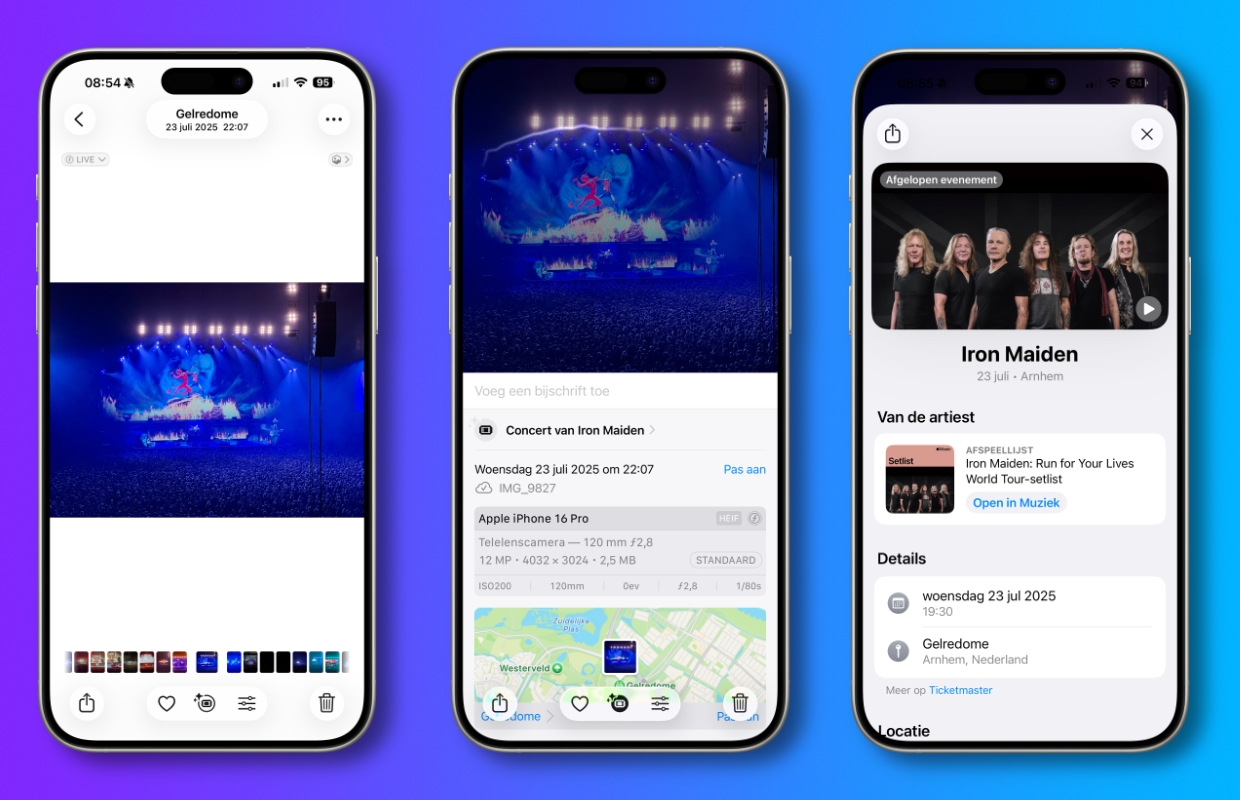
For example, if you have been to a concert, Photos not only shows where it was, but also extra details that you normally have to look for yourself. You will see the set list and which artists were there, among other things. You will even immediately receive a link with which you can play the setlist in Apple Music. At sporting events you will see a scoreboard, plus information about the location and future matches or events at the same location.
We tested the feature at an Iron Maiden concert and most photos and videos were recognized by the app. If you open a photo you took during the concert, a new icon will appear at the bottom of the screen if iOS 26 can recognize it.

If you tap this icon you will get more information and in our case we saw that it was an ‘Iron Maiden concert’. If you then tap on it, you will see the date and location, among other things. But if you scroll further down, the dates of future performances will also appear for some artists.
More Apple tips
-
This hidden iPhone feature makes the Photos app much smarter
-
iPhone tips: 5 useful features of iOS 26 that you hadn’t discovered yet
-
With this hidden function, your iPhone is much better protected
-
New telephone fraud: you should never say this to unknown callers
-
Watch YouTube for free without commercials: this is how you do it in 2026
-
New Spotify feature reveals what music you’re listening to – here’s how to prevent that
-
iOS 26 has a secret feature for your screenshots: here’s how to use it
-
What should you pay attention to with a business iPhone subscription?
-
Beware: new form of scam via iDeal – this way you stay safe
-
iPhone tips: 4 settings you need to adjust immediately in iOS 26!