
Google has made Android 12 available for existing and new smartphones and tablets. PC-Active explains the innovations and improvements in the software.
 Rens Blom
Android 12 is the successor to Android 11, which came out last fall. Google develops a new Android version every year and makes it available for free to smart phone and tablet manufacturers such as Samsung, Xiaomi and Oppo. They optimize the software for their various smartphones and tablets and often also implement visual changes via their own software shell. Usually the brands also add extra functions and install apps from themselves and/or partners. For that reason, Android 12 looks different on a Samsung device than on a model from Oppo or Xiaomi.
MATERIAL YOU STYLE
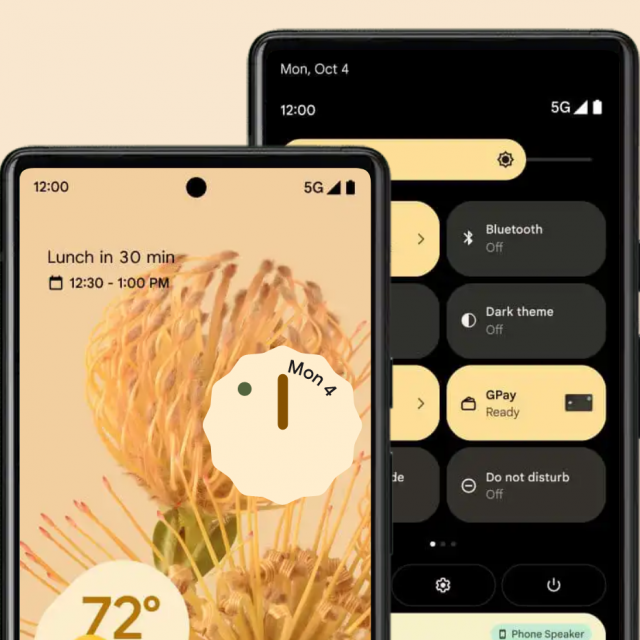
Every Android version looks a little different, but the changes have been minor in recent years. This year it is different: Android 12 implements a whole new design, which is provided by Google . Material You has been mentioned. First of all, the new software looks a lot fresher, with rounder corners and larger buttons for quick settings. Notifications in the familiar notification bar are also more clearly designed and grouped. Interesting to Material You is that the software adapts in terms of colors to your style. Android 12 mainly does this based on the background on your smartphone. If you use a dark background, you will also see the Android operating system in a dark mode. The accent color depends on the background, but can be adjusted – which is nice. If you have a light background with, for example, fresh green plants, Android 12 will adapt by making more use of the colors white and light green. Google apps adopt these colors. Gmail, the Google Calendar and other well-known apps therefore adapt to your color style and make Android 12 more personal than previous versions. Google urges external app developers to make their apps technically suitable for Material You, so that in the long run all Android apps will change color. Time will tell which developers will do that and when.

PRIVACY DASHBOARD
Android 12 also gives you more insight into your privacy and control over how apps handle your data. Google introduces a new one here Privacy Dashboard for, a feature in the Android 12 settings menu. The Privacy Dashboard shows exactly which apps are on your device, which data they have access to and which permissions they have. For example, a photo editing app needs access to your gallery, otherwise the app cannot load photos. More transparency about the possibilities of apps (and games) is nice, because it gives you a better idea of what apps are doing in the background. It is very handy that you can revoke app and game permissions via the Privacy Dashboard. Keep in mind that the app or game may no longer work properly after that. Google is introducing more privacy-related innovations in Android 12. For example, your smartphone or tablet shows a subtle but clear notification at the top of the image when an app or game uses your microphone or camera. And if an app or game wants access to your location, you can indicate that you want to share your global location. This gives the app or game a picture of the city or village area where you are, without revealing your exact GPS location. In older Android versions, you could only share your GPS location. If an app or game on your Android 12 device really needs your precise location, for example to navigate, you can of course just pass it on.
GET MORE STORAGE SPACE BACK
Also cleverly conceived is Google’s way of reclaiming more storage space from your smartphone or tablet. Android 12 continuously studies which apps and games you have installed on your device and how often you use them. The software removes the temporary storage of apps that you haven’t opened in a while. Those apps are also put into a kind of sleep mode, so that they use less power. Of course you can just open such an app, after which it works completely again within a few seconds. If you really haven’t used an app for a while, Android 12 suggests you uninstall it.

FOLDABLE SMARTPHONES
Another notable improvement in Android 12 is interesting for foldable smartphones and tablets. There are few of these now: actually only Samsung (Z Flip and Z Fold) and Motorola (razr) offer a handful of pricey models. Google makes the software more suitable for these devices, but especially for future products. For example, there are strong indications that Google itself is also developing two different types of foldable smartphones and wants to release them in 2022.
On a foldable smartphone, Android 12 works better than Android 11, because the software as a whole deals smarter with the staggered screen space when the device folds in and out. Google has also made technical improvements so that apps and games automatically use the correct screen size.
SMARTPHONE AS A REMOTE CONTROL
In the Android 12 software you will find many more smaller improvements. For example, in Android 12 you can start the Google Assistant voice assistant by briefly pressing the on and off button on your device. Handy, but many brands have already built this feature into Android 11. If that is also the case on your smartphone or tablet, Android 12 will not change this.
Really new is the ability to use your Android 12 phone as a remote control for your television that runs on Android TV software. On your smartphone, you can navigate with your fingers, type passwords and search for movies. This is more user-friendly than with the remote control, as Google has also established. Of course you can also continue to use the remote control. to choose and light or Dark to select. CHROMEBOOK AND SAFETY
Another nice improvement is that an Android 12 smartphone or tablet works better with a Chromebook than an Android 11 device. Chromebooks are laptops with Google’s Chrome OS and are gaining popularity. With an Android 12 device, photos and videos sync faster with your Chromebook, so you don’t have to wait as long to view a photo you took on your laptop.
It is also interesting that Google will more often make smaller security updates available through its Play Store app store. This way, Google can automatically and quickly update your smartphone or tablet without the intervention of the manufacturer of your device. Google also makes a security update available to manufacturers every month, but they are not obliged to roll it out to your device every month. The more often and faster your device is updated, the safer it is to use.
ANDROID 12 ROLL OUT HAS BEEN STARTED
As mentioned, Google has just made Android 12 available to manufacturers, who can now update their smartphones and tablets. It is impossible to predict exactly how this will happen. Manufacturers determine 
largely decide which devices they update and when and in what order they do so. Modern smartphones and devices will receive Android 12, but that is uncertain for older models. If you’re not sure whether your device is eligible for an Android 12 update, it’s best to check with the manufacturer.
Starting this month, more and more new smartphones and tablets will already run on Android 12 out of the box. That is nice, because with such a device you immediately benefit from all improvements and innovations and you do not have to wait for the brand to make the software update available.
HUAWEI AND ANDROID 12
It is good to emphasize that all manufacturers of Android smartphones and tablets get access to Google’s Android 12. However, it seems strongly that Huawei will not make the software update available for its existing devices. That’s bad news for Huawei smartphone users. The reason is that the manufacturer has been blacklisted by the US government since May 2019 and is therefore not allowed to cooperate with US companies. The US suspects Huawei of spying for China – something for which no official evidence has yet been provided. Since Google is a US company, Huawei will not be able to access the full Android 12 version and associated support from Google. The open Android version that Huawei is allowed to use lacks Google software and is difficult to update. Huawei has therefore switched to its own Harmony OS software, which is not Android. For Huawei users, the introduction of Android 12 is therefore less relevant.
