
Every iPhone has had a hidden button since 2017, which you have to activate yourself. This is how you use the secret button!
iPhone has hidden button
Do you have an iPhone from 2017 or later? In that case, your iPhone has a secret button that only works if you enable the button. Apple has equipped the iPhone 8 and newer with a touch-sensitive back. This means that the back of all iPhones since 2017 have an invisible button. This function is not exclusive to the Pro models, the regular iPhones also have a touch-sensitive housing.
All iPhones have had the option to link functions to the back of the housing for nine years. You decide how many actions the hidden button on your iPhone activates. You can use these shortcuts by tapping the back of the iPhone two or three times. This way you can activate the camera, Siri or flashlight by simply tapping your iPhone. Curious how to do that? This is how you activate the secret button!
Text continues below the video.
@iphonednl Did you know your iPhone has a secret button?!🤯🤫 • 🪄 #iphonetricks #iphonetips #secret #knob #iphone14pro #techtok #learnoptiktok #backtap #tips #iphonehacks #tutorials #Dutch #ios18 #fyp #tricks #tipsandtricks #tech ♬ original sound – iPhoned.nl | Tips & Tricks🤓
Activate ‘Tap on back’
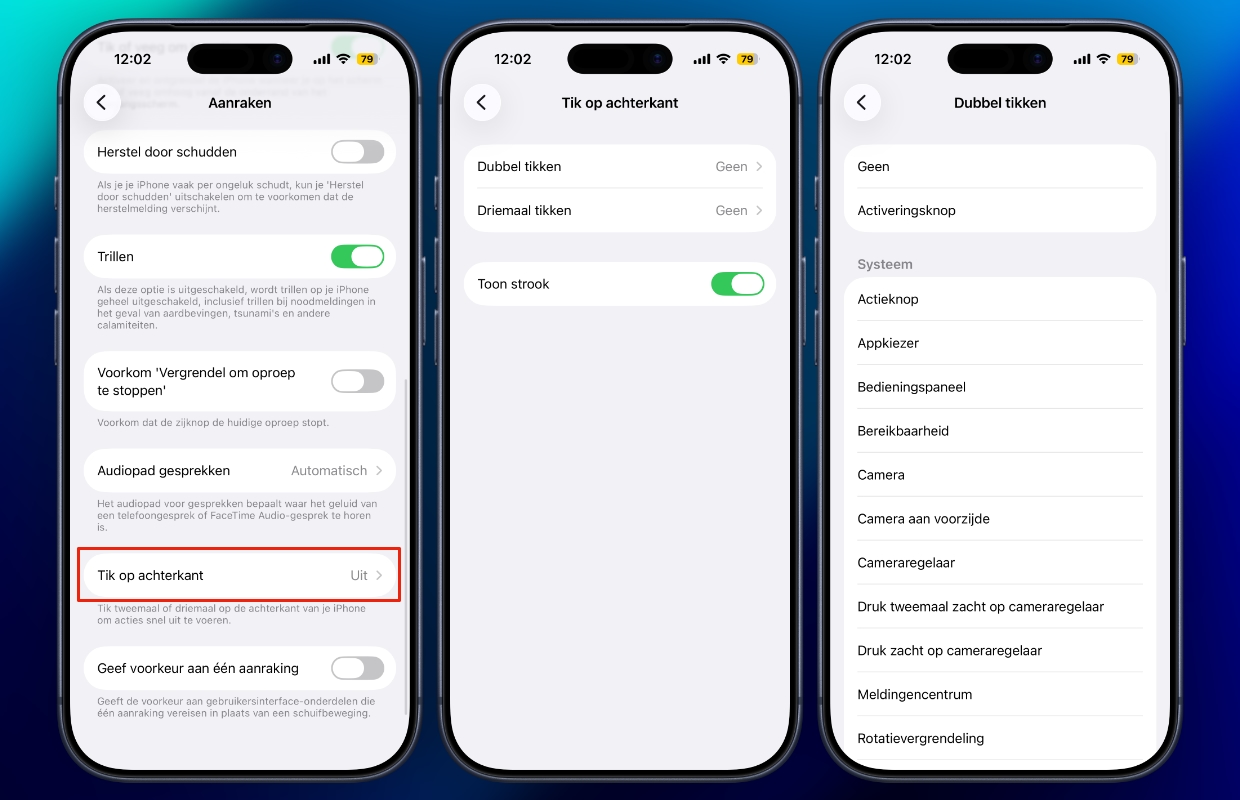
If you have an iPhone 8 or newer, the hidden button gives you quick access to more useful functions. You can choose from a large list of features of the iPhone, and you choose which ones you link to the touch-sensitive back of the housing. With two or three taps on your iPhone you can access the Control Center, magnifier and many more features. This is how you enable it:
- Open ‘Settings’ on your iPhone;
- Choose ‘Accessibility’;
- Go to ‘Touch’;
- Select ‘Tap on back’;
- Choose ‘Double tap’ and select a function;
- Go back and go to ‘Three taps’;
- Finally, choose a function under ‘Three taps’.
Have you selected functions for ‘Double tap’ and ‘Triple tap’? In that case, the hidden button on your iPhone is immediately activated. You can use the shortcuts by tapping on the back of the device. It is wise to choose features that you use regularly, so that you always have them within reach. For example, do you often take screen photos? Then choose ‘Screenshot’, so that from now on you can do this with just two or three taps on the back of your iPhone.
More iPhone tips
The iPhone 8 was released in 2017, so most users now have a newer device. Every iPhone has since had this hidden button, which gives you quick and easy access to frequently used functions. Did you find this tip useful and would you like to know more? View more tips about the iPhone here, so you can get even more out of your device:
-
iPhone tips: 4 settings you need to adjust immediately in iOS 26!
-
This secret iPhone button has been hidden for 9 years (but here’s how to activate it)
-
Turn off “Download and Save Originals” to save space
-
This way you prevent apps on your smartphone from (secretly) listening in on you
-
You must enable this iPhone feature every day (for this benefit)