
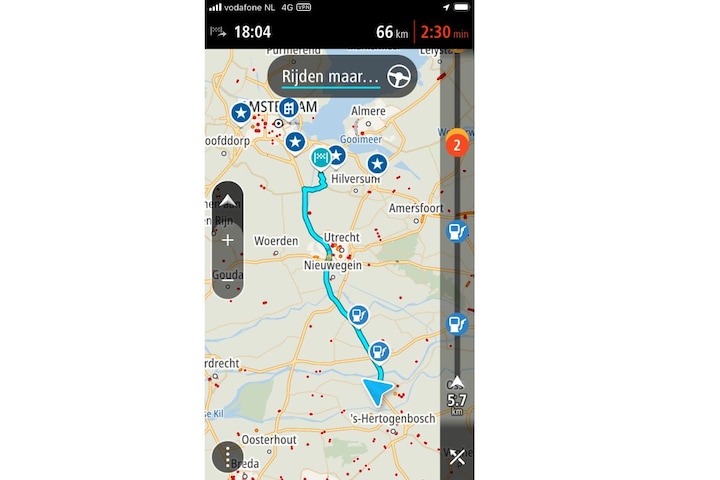
If you drive an electric car at a greater distance, you will have to top up at some point. In day-to-day practice, the coverage of public charging stations will be quite sufficient for most people. If you drive a little more, it is useful to see where you can find a fast charger along your route. Here lies a rewarding opportunity for navigation apps, both in the cars themselves and on a smartphone. When is it coming, TomTom?
Let me give a concrete example. I recently had to go to Chateau Neercanne. Not the restaurant, but close by. From my hometown near Hilversum it was just over 200 km, a distance that I can in principle drive in one go with my Citroën ë-C4 without a major stopover (at least if I maintain 100 km/h and without really winter temperatures ). So no ride that you have to prepare with an app like Pump, A Better Route Planner or something like that. Moreover: fast chargers are available at almost every petrol station along the A2, sometimes even from Shell and Fastned or, for example, Allego. Because there is no charging station at the destination, my plan was to give a ‘top up’ fairly close to Maastricht so that I would not arrive at the destination practically empty or have to look for a slow charger there (with a charging app). .
So my antennas went past Weert ‘on’, with a little way to go. However, unlike the rest of the route, the last three filling stations did not have a fast charger on site (at Esso Het Anker there was one in preparation for the earthworks, so things will be better in the future). I drove past Stein-Urmond, in principle I could have moored there at Van der Valk while enjoying a cup of coffee, but that would mean a small detour. After all, the route bar of the TomTom Go app indicated a station on the road I still had to go. However, I also drove into the parking lot at BP Vossedal in vain. In the meantime, the counter of the range stood at 30 km range with roughly 21 km to go to the final destination. If you know the Stellantis algorithms, this means that I would make it to the destination, but then I would really need a charging station there. So I drove into Bunde anyway to get a few kilometers at a public charging station. In short: one was defective, another that was on the map was not (easy) to find. A third did. Phew. And there I looked for a fast charger that was within reach, somewhat on the route. Because having to drive back ten kilometers on the highway would not be practical either. After some searching I found one a few kilometers further at a MacDonald’s at the beginning of Maastricht. Hurrah!
Does this sound cumbersome? Perhaps. Could I have prevented it? Yes, by looking for a range of approximately 80 km and more than 50 km before the destination, by connecting to a fast charger earlier and enjoying a cup of coffee. The navigation built into the Citroën itself? It does indicate chargers, but not the difference between locations with fast chargers and slower chargers. That would be a good improvement. And you often only see them on the map in front of a stopping place when you are approximately at the level of the exit. And to drive I find the built-in navigation is not pleasant. That’s a personal preference, though. I don’t have to hear well before every intersection, a little before an intersection and at an intersection (as an example) what to do from the voice that also reads the full street names. That’s very annoying when you’re listening to a podcast on the go. In addition, the map that is built into the car (also from TomTom) is less current than the app. That’s why I usually use apps like TomTom Go or Waze. You can set it to give only extraordinary warnings.
And with TomTom Go I find it useful to have the route bar on the side. Next to gas stations you can see upcoming traffic jams, accidents and the like. However: despite the larger share of electric cars, the charging stations (without distinction between public chargers and fast chargers) are hidden fairly deep in menus. While on a ride like me you just want to know what to expect. That’s super handy with the TomTom Go sidebar. However: why can’t you just indicate in that app that you have an electric car and that you want to see fast chargers for such trips instead of gas stations? Rides that you don’t want to plan as a long ride with a charging app (because they indicate that you don’t need a charging stop), but where you do want to look ahead? A missed opportunity, because the data is known to TomTom.
Another app you like to use, Waze, doesn’t even let you indicate that you have an electric car. The charging stations are largely on the map. This is possible with the free TomTom AmiGo, but it does not indicate charging options further along the route (at least not without having to select it first). You can also select an electric car at Here We Go. You will then see all charging options, but only if you are reasonably close. Charging apps such as Chargemap, Smoov, Shell Recharge let you search for charging stations in the area where you are, but you then have to manually scroll along your route and that is not always convenient (because the destination is in another app).
In short, TomTom, pick up the gauntlet and make sure that the route bar can be set to clearly see fast chargers on the rest of your set route for the through electric traffic. That will certainly add value to the paid app TomTom Go. And for the other navigation suppliers: you can also pick up the glove!
– Thanks for information from Autoweek.nl