
Apple has brought a new feature to the iPhone this year, but it causes the battery to drain much faster. This is how you prevent that!
New iPhone feature
Apple has announced the new iPhones of 2025! The iPhone 17 is this year’s base model and carries over many features from previous Pro models. The regular iPhone will have a ProMotion screen with a refresh rate of 120Hz for the first time in 2025. This means that Apple has equipped all iPhones with an always-on screen this year, while this feature was previously exclusive to the Pro models.
With the always-on screen, your iPhone – as the name suggests – always stays on. This way, the clock and background of the lock screen always remain visible. The advantage is that you always know what time it is and you can see notifications, but unfortunately there is also a disadvantage. The new iPhone function ensures that the battery drains much faster. Do you want to prevent that? We explain which settings you need to adjust on the iPhone for this!
Text continues below the video.
@iphonednl Did you know that your iPhone BATTERY will last much longer if you TURN OFF this feature?! It’s called ‘Always On’ – here’s how to turn it OFF! #creatorsearchinsights #iphonetips #iphonetricks #batterytips #ios18 ♬ Monkeys Spinning Monkeys – Kevin MacLeod & Kevin The Monkey
This is how you disable always-on
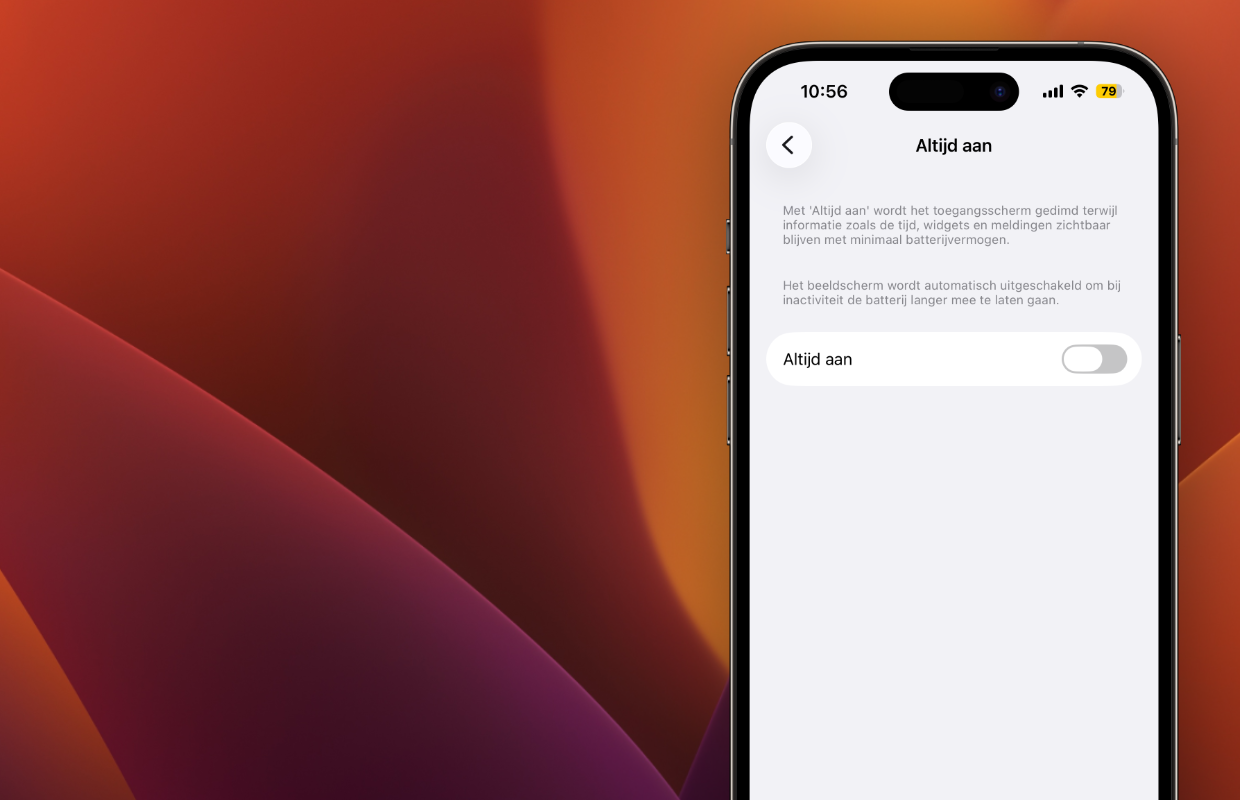
Did you get the new iPhone 17? Or do you have an iPhone 14 Pro or newer Pro model? In that case, the new iPhone function is turned on by default, while it ensures that the battery drains faster. When setting up your new iPhone, Apple automatically turns on always-on. If you want to save on your iPhone’s battery, you can easily turn off the function. You do this as follows:
- Open ‘Settings’ on your iPhone;
- Go to ‘Screen and brightness’;
- Tap ‘Always on’;
- Turn off the switch behind ‘Always on’.
Have you adjusted the settings of your iPhone? In that case, the new iPhone function no longer drains the battery faster. If you still want to see the time on your iPhone’s lock screen, you can also enable ‘Always on’. To save on your iPhone’s battery, it is advisable to turn off the switches behind ‘Show background’ and ‘Show notifications’. This way you always see the clock, but the effect on the battery is minimal.
More iPhone tips
Turning off the always-on screen is an easy way to save your iPhone’s battery. It is advisable to disable this iPhone function, especially on earlier devices, because they have an older battery. While the iPhone 17 series has a greatly improved battery life, this does not apply to previous iPhones. Especially with iPhones that have been in use for years, there is a good chance that the battery condition has deteriorated.
Have you purchased an iPhone 17? In that case, you don’t have to worry about the battery life, because the phone lasts at least 31 hours with normal use. If you cannot charge the iPhone for a long time, turning off the always-on screen is a useful way to use the battery even longer. Do you want more battery saving tips for the iPhone 17 and earlier iPhone? Read here how you can save on the battery of your iPhone! Also subscribe to our daily or weekly newsletter so that you regularly receive useful tips for your Apple devices!

Download the iPhoned app

Subscribe to our newsletter