
Do you regularly call via WhatsApp? Then enable this important feature before answering a call in WhatsApp!
Calls in WhatsApp
WhatsApp now offers many more options than sending and receiving text messages. You can share voice messages, record short video messages or simply make a call. The big advantage of WhatsApp is that the messaging service is completely free to use, so you don’t use any calling minutes from your mobile subscription, for example. Instead, you make a call in WhatsApp via the internet connection.
Unfortunately, this also has a disadvantage, because your IP address can be found more quickly via these calls in WhatsApp. This way, other participants in the (video) conversation in WhatsApp can find out your location. Would you rather not? In that case, WhatsApp has an important feature that hides your IP address from others when you answer a (video) call in the application. We will explain to you where you can find this function.
Text continues below the video.
@iphonednl Turn ON this WhatsApp privacy feature before recording a call! This way your IP address and your location remain protected. #whatsapp #whatsapptips #privacy #iphonetips #techtok Blade Runner 2049 – Synthwave Goose
Hide IP address
WhatsApp has long offered the option to hide your IP address during calls. Without an IP address, it is difficult for other users to find out your location. It is therefore an important feature to improve your privacy in WhatsApp. Do you regularly have an audio or video call via WhatsApp and do you want your IP address not to be visible to other participants in the call? Then adjust the following settings:
- Open ‘WhatsApp’;
- Tap ‘Settings’ in the menu bar;
- Choose ‘Privacy’;
- Go to ‘Advanced’;
- Finally, turn on the switch behind ‘Protect IP addresses in calls’.
With this feature enabled, WhatsApp calls are safely routed through the messaging service’s servers. This way, your location cannot be traced using your IP address. Group calls are already routed via WhatsApp servers by default, but this does not apply to direct calls. All audio and video calls in WhatsApp remain end-to-end encrypted, even if they are routed through servers to hide your IP address.
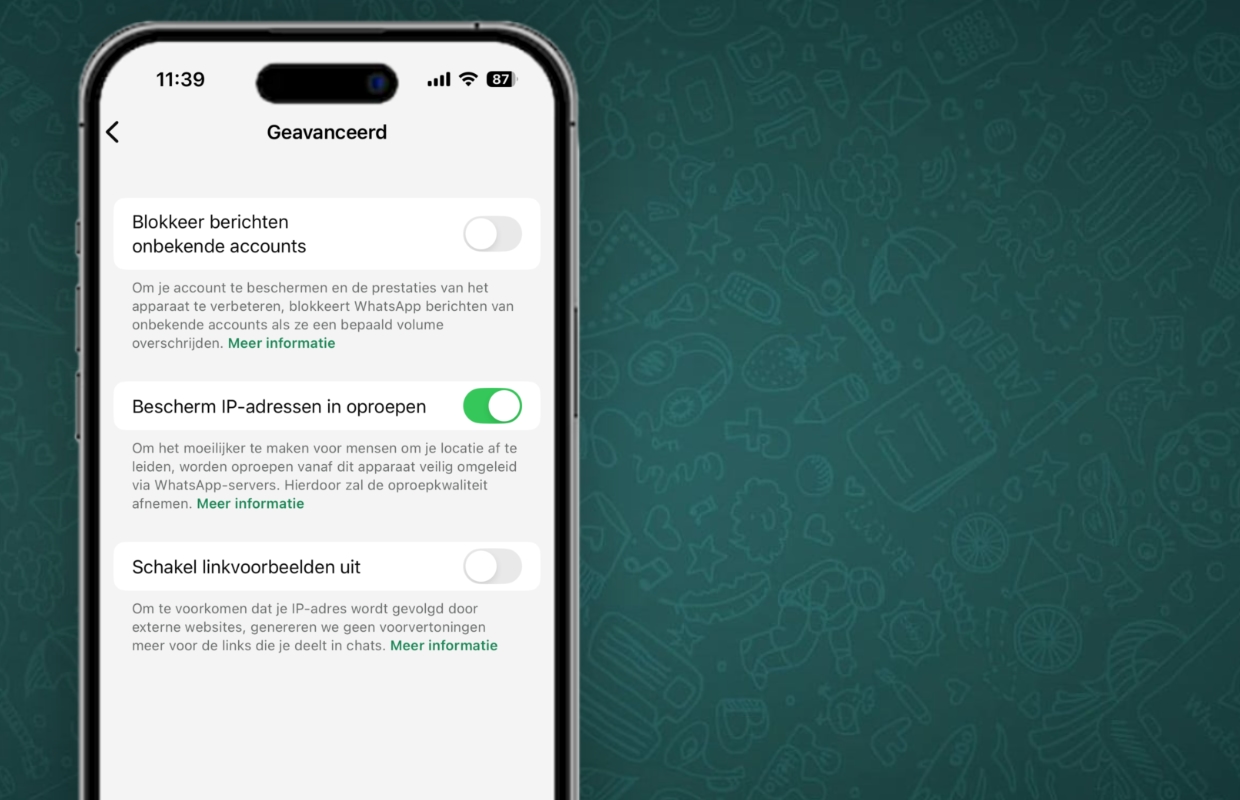
Privacy in WhatsApp
Have you adjusted the WhatsApp settings? In that case, your IP address will be hidden when making calls via WhatsApp. This way you can call via the messaging service without worrying about your calling minutes and privacy. Be careful, because WhatsApp warns that the quality of the call may deteriorate with the function enabled. Calls are routed through WhatsApp servers, which may slightly reduce audio and video quality.
You don’t mind? It is wise to enable the function so that your IP address remains hidden from all users in WhatsApp. This is an important function, especially if you regularly receive calls from unknown numbers or sometimes have to call strange numbers. Did you find this tip useful and would you like to know more about WhatsApp? Then sign up for our daily or weekly newsletter so you get even more out of the messaging service!

Download the iPhoned app

Subscribe to our newsletter