
With iOS 26.3, an Apple app gets a useful function that was not yet available in iOS 26.1. This is how the new feature works!
iOS 26.3
A new software version is coming for your iPhone! Apple is working on iOS 26.3, which brings more features and improvements to the iPhone. One of those new features can be found in Apple’s Reminders app. This application should make it easier to remember tasks. For example, you can enter shopping lists or set reminders for making an appointment.
In the Reminders app you can enter a date and time so that you receive a reminder for the task at the right time. You will receive this reminder in the form of a notification, but it will soon disappear from view. There is therefore a great risk that you will forget the reminder. This will change with iOS 26.3, because Apple is bringing a useful feature to the Reminders app. That’s how it works!
Text continues below the video.
@iphonednl iOS 26 🆚 iOS 26.3 — New iPhone REMINDERS feature in iOS 26.3😮⏰📱 Apple introduces Urgent Reminders🚨 with a new “Slide to Stop” action — especially for really important reminders. This update is coming soon to ALL iPhones 📲 What do you think of this change?🤔 🪄 #ios26 #iphoneupdate #reminders #iphonetricks #apple ♬ Big Guy – from “The SpongeBob Movie: Search for SquarePants” – Ice Spice
Set alarm for reminders
While in iOS 26 you only receive a notification from the Reminders app, all users from iOS 26.3 can also set an alarm in the application. This alarm looks the same as the alarm clock in the Clock app, which you must actively close with a swipe across the screen. Snoozing is also an option, so that you are reminded of the notification again after a certain number of minutes. You set this as follows:
- Open the Reminders app;
- Tap the blue plus button (+) at the bottom right of the screen;
- Enter the name of the reminder;
- Turn on the switch behind ‘Urgent’;
- Enter the desired time under ‘Date’ and ‘Time’;
- Finally, tap the blue check mark at the top right of the screen to set the reminder.
Have you set an urgent reminder? You will then see a full-screen alarm at the time of the reminder. This alarm clock will always activate, even if your iPhone has a certain focus at that moment. The alarm will also sound if the sound on your iPhone is turned off. With this new feature in iOS 26.3, Apple ensures that you don’t forget a single reminder from the Reminders app.
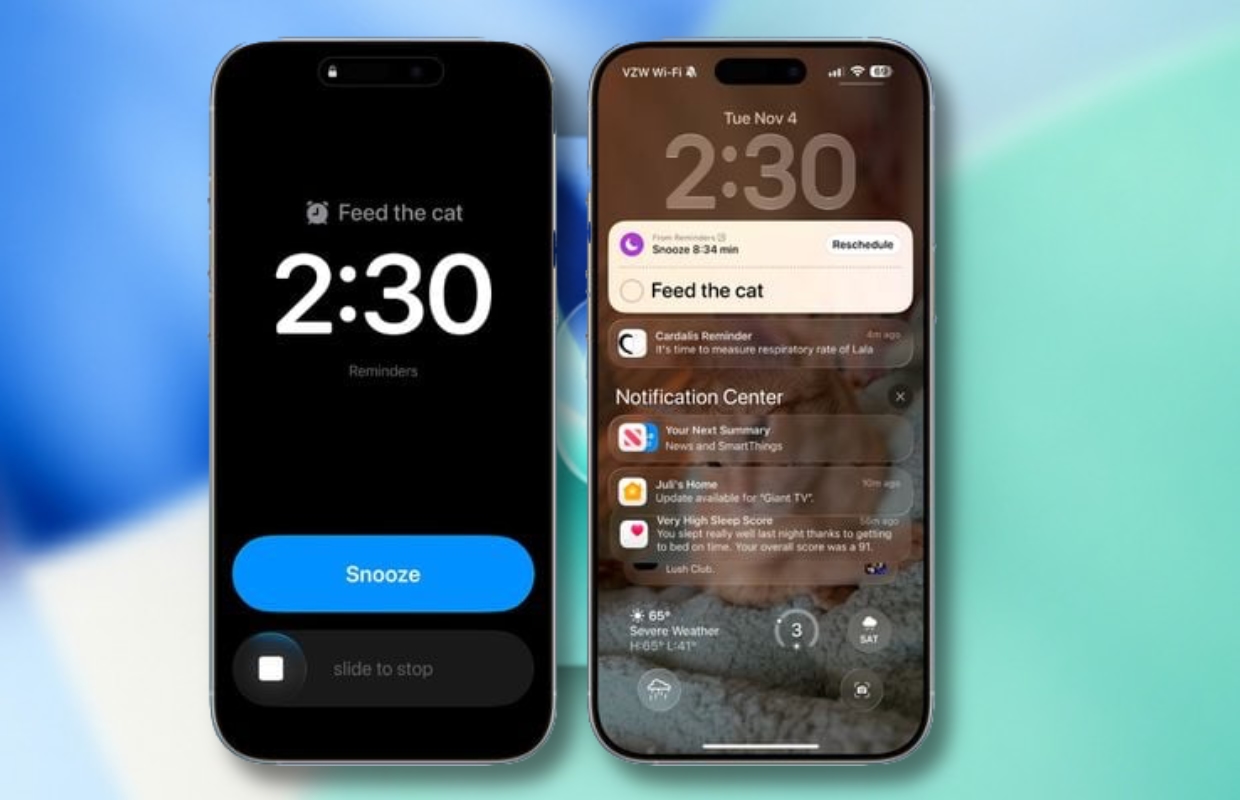
Part of iOS 26.2
Does this position look familiar to you? That is quite possible, because Apple has already rolled out the function for a number of users in iOS 26.2. With iOS 26.3, setting the alarm becomes available to all users. This is a big advantage, which will soon make the Reminders app more interesting to use. In any case, it becomes much easier to remember certain tasks.
Has the useful feature not yet come to your Apple device with iOS 26.2? In that case you don’t have to wait much longer, because iOS 26.3 will be released in January. Read here what the expected release date of the update is. Did you find this tip useful and want to know more about all the new features and software versions from Apple? Then sign up for our daily or weekly newsletter so you always stay informed!

Download the iPhoned app

Subscribe to our newsletter