
European legislation has made a new Instagram feature available, which all users should enable immediately. Here you will find the setting!
New Instagram feature
Instagram has added a new feature! This is not entirely voluntary, because the adjustment is the result of European legislation. Large tech companies such as Meta must comply with the European Digital Services Act. This law states that users must be able to determine what is shown on their timeline on platforms and online services such as Instagram. That was not the case with Instagram, because the algorithm determined which messages you see.
To comply with European legislation, an important change has been implemented by Meta, the parent company behind Instagram and Facebook. Users now have the choice between a chronological timeline or a timeline that is created especially for you. The latter works with Meta’s algorithm, while the chronological timeline only shows posts from the accounts you follow. Does the second one sound better? This is how you enable the new Instagram feature!
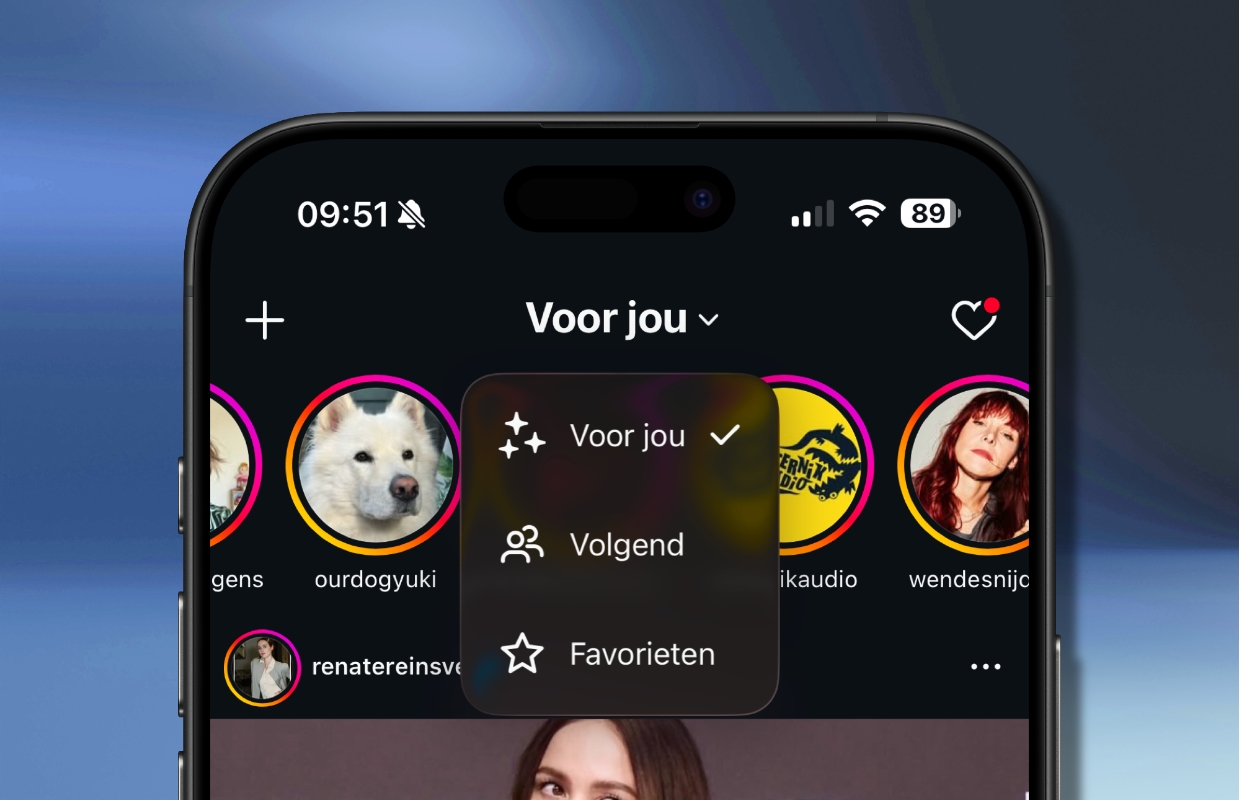
Enable next
It has been possible to change your timeline in Instagram to ‘Following’ for some time now. The difference with the new Instagram function is that this choice is no longer reversed when you close the application, while this was previously the case. So now you only have to choose ‘Following’ once, then you will see a chronological timeline with messages from accounts you follow by default. Do you want to enable this feature of Instagram? You do this as follows:
- Open Instagram;
- Tap the Instagram logo at the top of the screen;
This can also say ‘For you’ or ‘Following’.
- Finally, choose ‘Next’.
Have you enabled this Instagram feature? In that case, you will see a chronological timeline by default when you open Instagram. That means the newest posts from followed accounts will appear first. The big advantage of this setting is that you will no longer see posts suggested by Instagram. Suggested posts are often sponsored or disruptive, but are no longer visible when you choose ‘Next’ when viewing your timeline.

Instagram and Facebook
With the new Instagram feature, you decide which posts you see on your timeline. Do you dislike or find certain messages from an account irrelevant? Then you can unfollow or mute the account so that these posts no longer appear on your timeline. That is a big difference with the other view of Instagram, where the algorithm chooses which content you see. It is therefore advisable to enable the new Instagram function immediately, so that you can once again control what information you see on a daily basis.
Meta has not only added the new function to Instagram, you can now also opt for a timeline without an algorithm on Facebook. To do this, open the home page of the Facebook app, tap the Facebook logo and select ‘Following’. With these settings, you will only see the latest posts from the accounts you follow on both Instagram and Facebook. Did you find this tip useful and would you like to know more? Then sign up for our daily or weekly newsletter!

Download the iPhoned app
