
In early June, Apple made several announcements during the WWDC developer keynote. The biggest change for the iPad was saved by Apple until the close of the keynote.
Bert van Dijk
The new operating system iPadOS 16 will be released in the fall, making the iPad look more and more like a laptop instead of a large smartphone. Within the files app you can now change file extensions and see the size of folders. Also, after twelve years, Apple is finally releasing an iPad version of their weather app, with just as beautiful animations as in the weather app in iOS 15. Unfortunately, Apple’s calculator app is still not available for the iPad. The new operating system iPadOS 16 will be available for all iPad Pro models, but also for the iPad 5 (2017), iPad mini 5 (2019) and iPad Air 3 (with 10.5 inch screen).
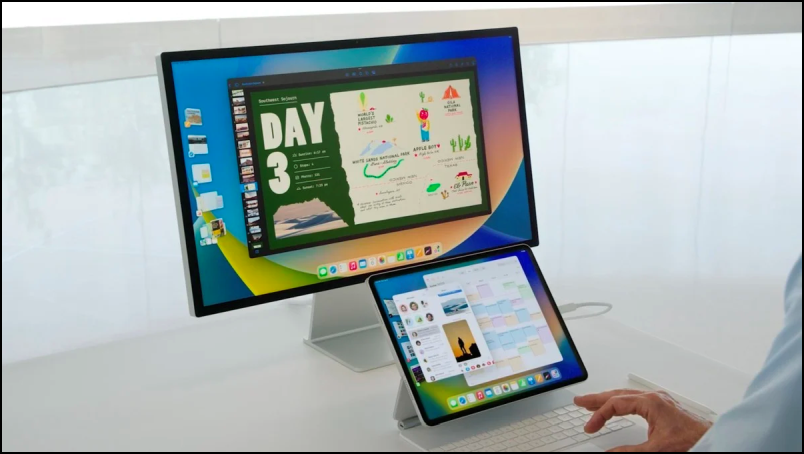 |
| You will soon also be able to work on an external screen on iPads with an M1 processor |
Multitasking
The most striking innovation is Stage Manager which unfortunately you can only use on an iPad with an M1 processor. According to Apple, the power of that processor is needed to use four extra apps in a high 6K resolution Display Zoom work smoothly on an external screen. The M1 processor can also quickly allocate 16 gigabytes of memory space to very large apps, making multitasking always smooth.
Without an external screen, you can work in up to four apps at the same time. It is also possible for the first time to place screens on an iPad above another screen. When you bring an app to the front, your previous app automatically moves a bit more to the background. The apps that you do not use for a while, you can quickly start again later via the small icons on the left.
You can drag the app screens from one screen to another and you can also adjust the size yourself. The screen you’re working in will automatically appear in the middle of the screen. If you make the screen very large, the dock with your favorite apps will automatically disappear at the bottom of the dock. Within that dock you can create app groups. For example, with one click you can Mail, Pages and keynote to open. This multitasking option is not enabled by default. In iPadOS 16, it is still possible to split the screen between two apps or float an app in a narrow window above another app. You can easily turn on the Stage Manager via a switch in the control panel that you open with a swipe from the top right corner. Holding that switch will also hide the dock and your previous apps on the left. If you then connect an external screen, the Stage Manager with the dock will automatically appear there. A similar Stage Manager will also be available in macOS Ventura this year.
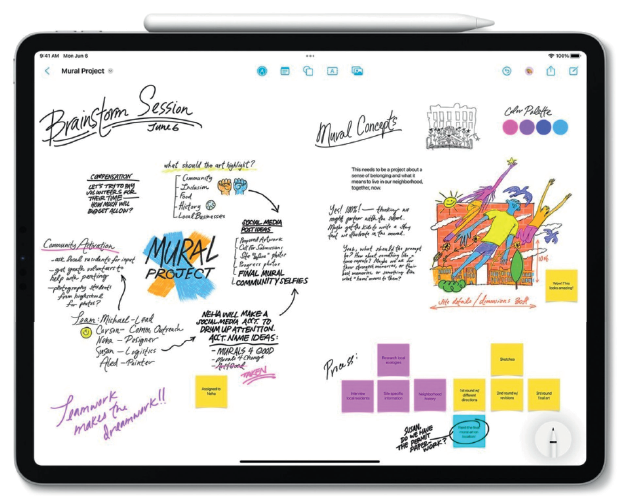 |
| Apple’s new Freeform whiteboard app is also ideal for online brainstorming sessions |
Collaborate in many more apps
From now on you can easily collaborate in a document with one or more people via the share button. Once something has changed, everyone will see a message at the top. Collaborating in this way is also possible from FaceTime and the Messages app. With new APIs, developers can make their own apps suitable for this collaboration. From now on you can easily collaborate in a document with one or more people via the share button. Once something has changed, everyone will see a message at the top. Collaborating in this way is also possible from FaceTime and the Messages app. With new APIs, developers can make their own apps suitable for this collaboration. Also, for iOS, iPadOS, and MacOS, Apple will likely come in a follow-up release of iPadOS 16 with a Freeform app that lets you write, draw, and add and move images and links endlessly in any direction. The Apple Pencil will certainly come in handy with such an app.
Shared photo libraries
With up to six people, everyone in a separate shared photo library can easily add their own photos manually so you don’t miss beautiful photos that someone else has taken. Photos that someone edits or deletes are updated for everyone in the photo library. You can easily automatically share all your photos from a specific date or all photos that include specific people.
What’s new is that you can now also recognize texts from video images that you pause. With the text button you can then copy and paste the text. It is also possible to convert amounts or translate texts.
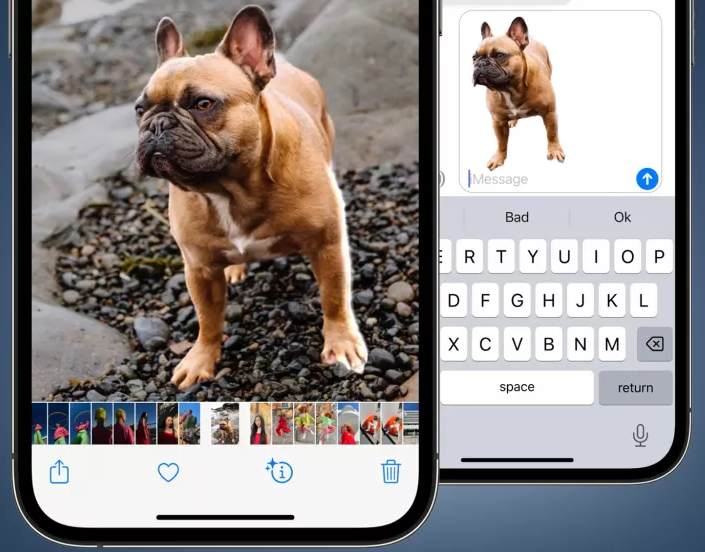 |
| Very handy, hold something recognizable to cut it out |
A very nice and new feature is that you will soon be able to separate people, animals and other recognizable objects from the background by holding it for a while. Then you can easily share it or paste it into another application. It works in photos, Screenshots, Quick view and in Safari. For this application you need at least an iPhone or iPad with A12 bionic chip.
Be careful which iPad you buy
With iPadOS 16, more and more desktop-like features become available, making iPad apps more powerful and making the iPad more and more the device that combines the best capabilities of iPhone and Mac.
It’s a shame that working with multiple apps on an external display and the new Stage Manager feature requires the latest iPads with M1 processor. To work with eight apps at the same time, you sometimes need 16 GB of RAM. The M1 processor can temporarily store ordinary storage space via Memory Swapo to be used as working memory. Hopefully, Apple will change its mind and there will be a kind of light version of Stage Manager so that owners of other iPads with a USB-C connection can also work with a smaller number of apps on an external screen.
Apple has been emphasizing how fast iPads are for many years, and then it’s actually unacceptable that this feature wouldn’t even be available in a slimmed-down form for the earlier iPad Pro models and iPads that haven’t been on the market for a year. On the iPad Air 2 from 2014 it was even possible to keep four apps open at the same time
Other new featuresThe new operating system iPadOS 16 has many more new functions:
|