
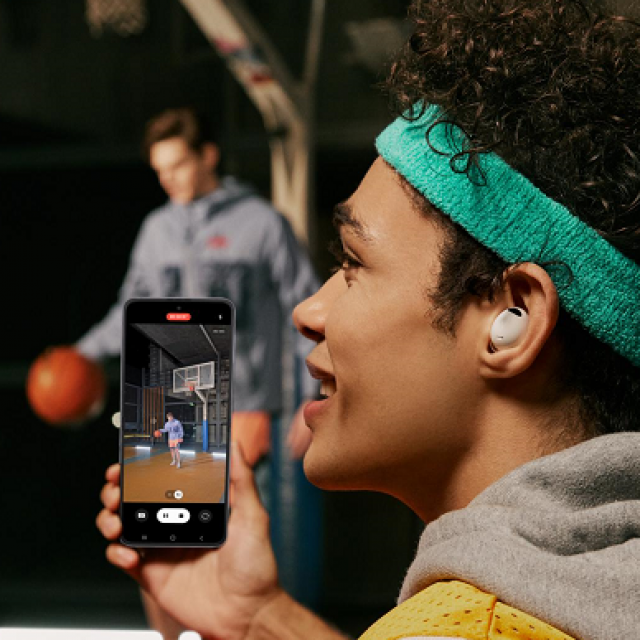
New software for the Samsung Galaxy Buds2 Pro and Galaxy Watch series gives users new possibilities for photos and videos. For example, 360-degree Audio Recording brings surrounding sound to video content and makes zooming in and out easier.
Samsung announces new software updates [1] for the Galaxy Buds2 Pro and Galaxy Watch series. The new software improves user experience capture just as it already does with Samsung’s Galaxy smartphones. This is improved by the pairing of the smartphone with the latest wearables. Thanks to 360 degree Audio Recording, surrounding sound is brought to video content. An upgrade of the Camera Controller also makes zooming in and out easier.
360 Audio Recording
With 360 Audio Recording [2] allows users to capture the sound in the video as they hear it. By connecting the Galaxy Buds2 Pro to a Galaxy smartphone, anyone can shoot videos with realistic sound anywhere, anytime, without the use of professional equipment. Because there is a microphone in each earplug, the sound can be picked up in 360 degrees. This makes it seem that the listener is actually in the room. This allows users with connected headphones to watch the videos with lifelike sound.
LEAudio
360 Audio Recording is the first feature in the Galaxy line to use LE Audio, a new and advanced Bluetooth audio standard. This new technology improves sound quality and reduces battery consumption. In addition, the LE Audio provides a more complex and richer sound, which also improves the sound experience. LE Audio now also brings sound recordings to the Galaxy Buds2 Pro by using the microphones on both the left and right sides simultaneously. When you connect the Buds2 Pro to a Galaxy Z Flip4 or Fold4 smartphone, you experience how the interplay of quality sound and video puts you in the middle of the room.
CameraController
Taking photos and videos with a Galaxy gives you creative control in any situation. An example of this is the Camera Controller app on the Galaxy Watch. This app allows users to control their phone’s camera right from their wrist. A new update, coming soon to the Galaxy Watch5 and Watch4 series, adds zoom capabilities to Camera Controller [3]. Users can operate the zoom camera remotely by simply pinching the dial or rotating the bezel around the screen. This feature is ideal for taking group shots or selfies from a distance.
Availability [4]
The new 360 Audio Recording feature will be released on January 17 via a software update on the Galaxy Buds2 Pro, Galaxy Z Flip4 and Z Fold4. The updated Camera Controller will be available in February on the Galaxy Watch5, Watch5 Pro, Watch4 and Watch4 Classic.
[1] The software updates are available in the Benelux from 17/01/2023.
[2] The feature will be available on Galaxy Buds2 Pro in combination with a Galaxy smartphone with One UI 5.0 or higher and with LE Audio support, including Galaxy Z Filp4, Z Fold4 and the upcoming Galaxy smartphones. Requires installation of the latest software versions on the Galaxy smartphone and Galaxy Buds. To activate the feature, go to Samsung Camera app > Camera settings after selecting Video mode > Advanced video options > enable 360 Audio recording.
[3] The feature is available on the Galaxy Watch5, Watch5 Pro, Watch4 and Watch4 Classic in combination with a Galaxy smartphone with One UI 5.1 or higher and with support for the Camera Controller app. Requires installation of the latest software version via the Galaxy Wearable app.
[4] Availability may vary by market, carrier, model and paired smartphone. The update is initially available on Bluetooth versions and will be rolled out to LTE versions later.
To learn more about the Galaxy Buds2 Pro, Galaxy Watch5 and Galaxy Watch5 Pro, visit:
• Galaxy Buds2 Pro: https://www.samsung.com/nl/audio-sound/galaxy-buds/
• Galaxy Watch5: https://www.samsung.com/nl/watches/galaxy-watch/galaxy-watch5-40mm-pink-gold-bluetooth-sm-r900nzdaeub/
• Galaxy Watch5 Pro: https://www.samsung.com/nl/watches/galaxy-watch/galaxy-watch5-pro-black-titanium-bluetooth-sm-r920nzkaeub/