
Apple is removing a useful feature from your iPhone keyboard with iOS 26. Curious which one that is? This way you get the feature back!
Keyboard in iOS 26
Have you installed iOS 26 on your iPhone and have you been making more typos since then? In that case, you’re not alone, because Apple has removed an important feature from the keyboard on your iPhone. In iOS 26, you no longer see a preview of the key you touch by default. Where you previously saw a large version of the pressed key, Apple has disabled this useful function of the keyboard in iOS 26 by default.
In iOS 18 and earlier, the letter, number or punctuation mark you press on the keyboard appears large on your screen. This way you can clearly see which key you are touching on your iPhone, but that is no longer the case in iOS 26. Apple has adjusted the iPhone’s settings, allowing you to enable or disable character previews yourself. Are you curious how to do that? We explain!
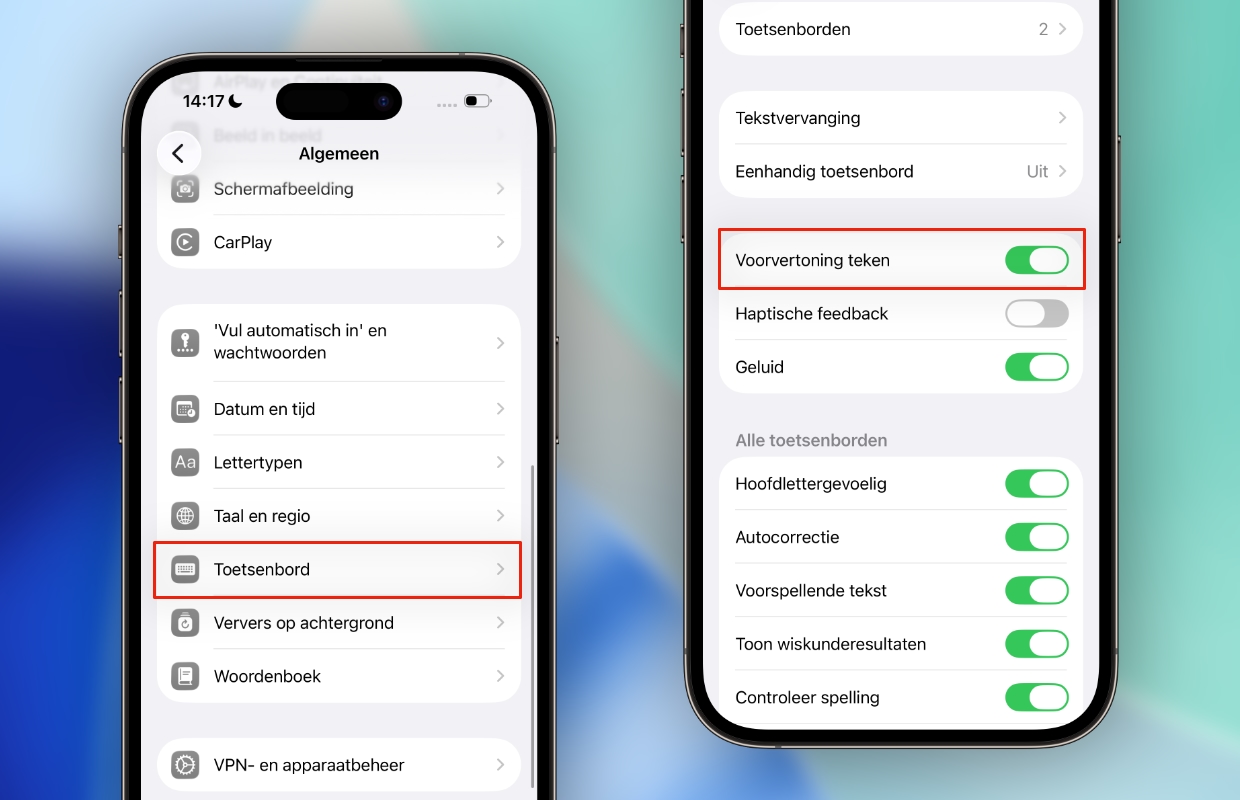
Enable preview
Do you have more difficulty typing after installing iOS 26? It is then advisable to enable the preview of characters on the keyboard again. This function makes it clearer to see which key you are touching, so you are less likely to make typos. This way you can immediately see whether you select the correct punctuation mark on your keyboard. Here’s how to turn preview back on in iOS 26:
- Open ‘Settings’ on your iPhone;
- Go to ‘General’;
- Choose ‘Keyboard’;
- Turn on ‘Character Preview’.
Have you enabled preview again on your iPhone? You will then see much more clearly which letters, punctuation marks and numbers you type on your keyboard. Preview is a useful tool to help you reduce typing errors. If you touch an incorrect key, this is immediately visible, so that you can correct the incorrect punctuation mark. This prevents the word from becoming unreadable due to multiple typos in a row.

More about iOS 26
iOS 26 brings many new features to your iPhone, but Apple is also disabling a useful feature. The disappearance of the preview is a subtle change that you may not immediately notice in iOS 26. However, the preview is an important function of the keyboard, because it makes typing on your iPhone easier. This feature is not available on the iPad, it remains exclusive to the iPhone.
Especially if you make more typos in iOS 26, it is advisable to enable preview again. The keyboard’s function helps many users to type more accurately and make fewer spelling mistakes. Did you find this tip useful and would you like to know more about iOS 26? Then see here what other problems iOS 26 brings to your iPhone and how to solve them! Also subscribe to our daily or weekly newsletter so you always stay informed!

Download the iPhoned app
