
WhatsApp has been expanded with Meta AI, which remembers your chat history. Do you want to prevent that? Then use this function!
Meta AI in WhatsApp
In the spring of 2025, Meta AI came to WhatsApp. Meta’s new service works with artificial intelligence and can answer the majority of your questions. You can recognize Meta AI by the blue circle in WhatsApp, which appears in the overview of all private and group conversations. It is not possible to disable Meta AI for all chats at once, instead you must manually disable the new service for each conversation separately.
Don’t you do that? In that case, the chatbot records all messages that mention @Meta AI. These are your personal messages in private and group conversations, provided you explicitly mention Meta’s chatbot. In addition, all messages that you mention in the direct conversation with Meta AI are stored by the chatbot. This way, Meta AI remembers all relevant messages you have sent in WhatsApp. Do you want to prevent that? Then there is an easy way to reset Meta AI.
Text continues below the video.
@iphonednl ⚠️ WHATSAPP META AI WARNING ⚠️📱 That little circle at the bottom right of WhatsApp — Meta AI — can remember your chat history 😱💬 You can NOT delete it, but you can reset everything Meta AI has stored about you ❌🤖 This is how you protect your privacy🔒 🪄 #whatsapp #metaai #privacy #iphonetips #whatsapptips ♬ Mysterious and sad BGM(1120058) – S and N
Resetting Meta AI
Do you regularly ask Meta AI questions in WhatsApp? Or do you mention the chatbot in private or group conversations in WhatsApp? In that case, Meta AI has made a copy of all shared chat messages. These are stored by Meta to collect data about you. Meta AI is becoming increasingly smarter, but you can also prevent that. You can easily reset Meta’s AI chatbot. This is done in WhatsApp as follows:
- Open ‘WhatsApp’;
- Go to the ‘Chats’ tab;
- Tap the blue circle to open Meta AI;
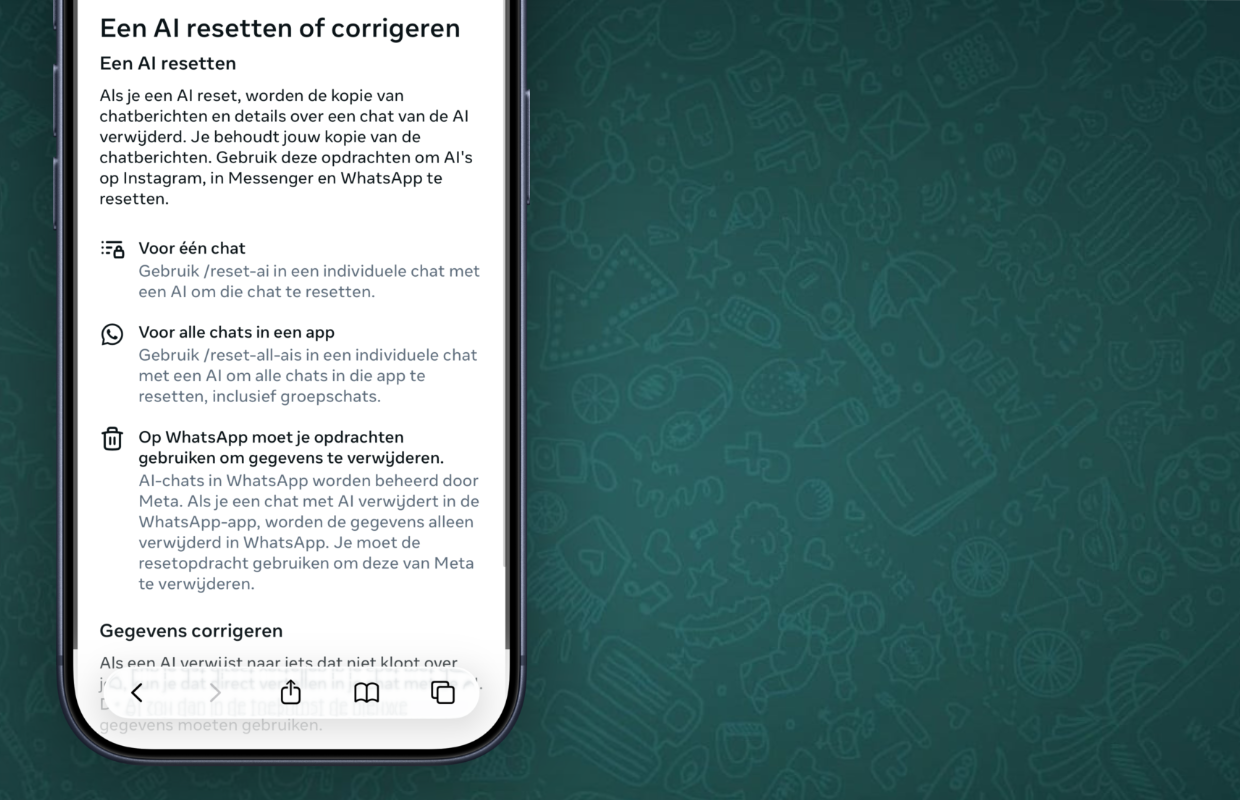
- Enter ‘/reset-all-ais’ at the typing bar;
- Press the send button to reset Meta AI in WhatsApp.
Have you /reset-all-ais entered during the conversation with Meta AI in WhatsApp? The chatbot will then be completely reset. All saved chat messages will be deleted by Meta AI. Please note, because this concerns the complete chat history with Meta AI. Would you rather not? You can also delete Meta AI’s saved messages in one conversation. To do this, go to an individual chat and use ‘/reset-ai’ to reset Meta AI in that conversation.
More about WhatsApp
The reset command prevents Meta AI from saving an entire chat history with your messages. The messages are only deleted in Meta AI, but they remain stored in your own WhatsApp chats. This way you won’t lose any messages with the function, but you will ensure that Meta AI knows less about you. Resetting Meta AI is such a useful feature to improve your privacy in WhatsApp.
It is wise to reset Meta AI every now and then, so that you can be sure that your messages are not stored in WhatsApp. Here we tell you how to disable Meta AI for all conversations in WhatsApp. Did you find this tip useful and would you like to know more about WhatsApp? View more articles here so you can get even more out of the messaging service:
-
This way you prevent Meta AI in WhatsApp from remembering all your messages
-
WhatsApp gets a useful feature (which we have been waiting for for a long time)
-
WhatsApp profiles are getting an important update – this is what it looks like
-
These 3 useful WhatsApp features are now available (and here you can find them)
-
WhatsApp adds hidden feature for all users (and here’s how you get it)
-
Send WhatsApp Christmas wishes to multiple people with one tap
-
Beware: new scams via WhatsApp – turn this feature off immediately
-
WhatsApp seems safe, but without this feature your account is still vulnerable
-
Enable this important feature in WhatsApp before recording a call
-
iDEAL will disappear permanently and WhatsApp will remove a popular feature (iPhone news #49)