
WhatsApp has a hidden smart feature! Curious where you can find it? This is how WhatsApp’s new feature works.
WhatsApp introduces member tag
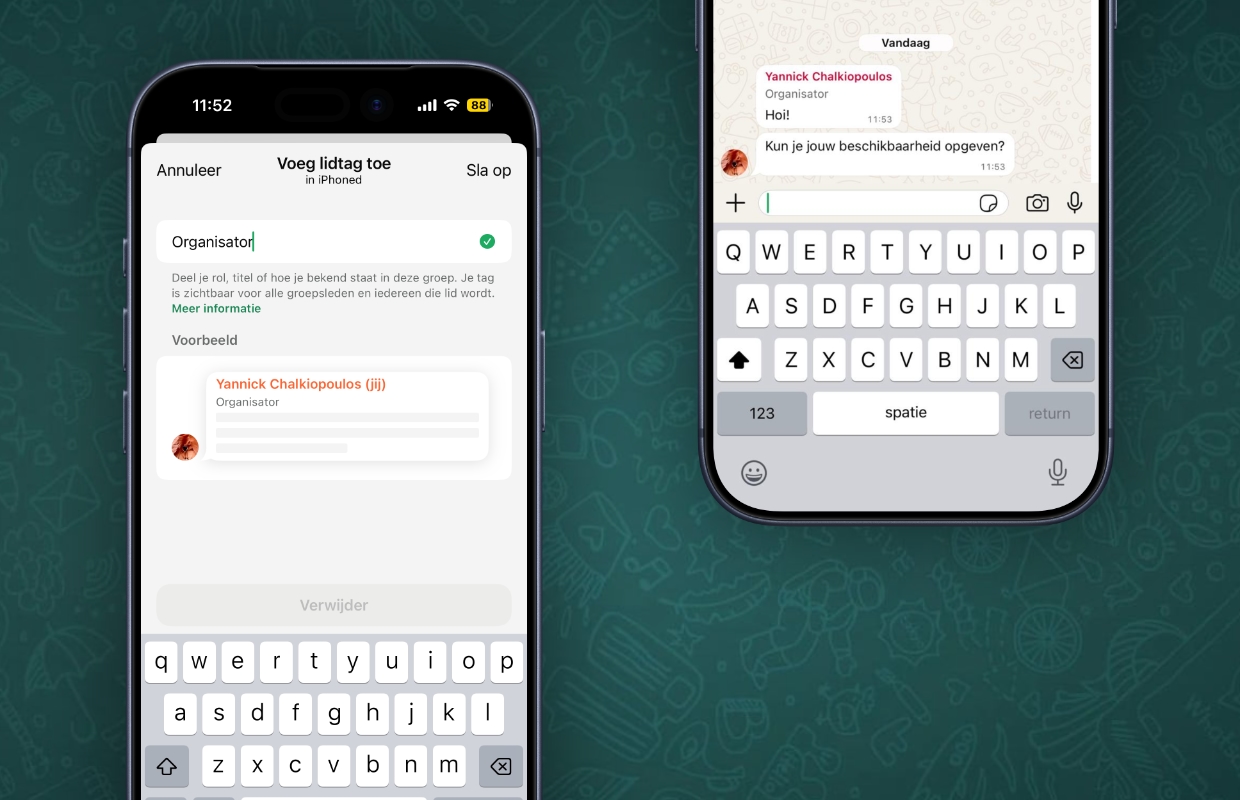
Another update for WhatsApp is available! In the new software version, WhatsApp has added a hidden feature for all users. During group conversations it is now possible to enter a member tag. This tag is for adding your role, title or how you are known in the group as a description below your name. This label is visible to all (future) users in a group conversation.
Have you added a member tag to your data in a group conversation? The description of the label will then appear under your contact name with every message you send in the group chat. In this way, group conversations become much clearer, so you can see exactly who has which position in the company in a group of (unknown) colleagues. Are you going away for a weekend? Then you can accurately fill in what you arrange for the trip. You have to look carefully for the function, because adding a member tag is in a hidden place in WhatsApp.

This is how you add a member tag
Adding a member tag is a small effort and ensures that group conversations are much more organized. Users must add a label themselves in a group chat, administrators cannot do that for other group members. This way you decide which member tag appears under your name in a group conversation. Curious how to do that? Here you will find the hidden function in WhatsApp:
- Open ‘WhatsApp’;
- Go to a group conversation and open the chat;
- Tap the group name above the conversation;
- Scroll down and tap ‘Add Member Tag’ below your name;
- Enter a member tag of your choice;
- Finally, choose ‘Save’.
Have you added a member tag? This will then automatically appear in the relevant group conversation. You can set a separate label for each group chat, so that you get a suitable member tag for each conversation. The set label only appears in the group conversation you have opened, the member tag is not visible in other conversations. The new feature in WhatsApp is not mandatory for group members, you decide whether you add a member tag to your contact details.
More about WhatsApp
WhatsApp has added a useful feature to group conversations with member tags. Has your position, role or description within a group changed? In that case, you can adjust your member tag in the group conversation settings in the same way. You can also delete it by tapping on the label and choosing ‘Delete’. Your name will then be shown in the group conversation without a member tag. Did you find this tip useful and would you like to know more? View everything about WhatsApp here:
-
WhatsApp adds hidden feature for all users (and here’s how you get it)
-
Send WhatsApp Christmas wishes to multiple people with one tap
-
Beware: new scams via WhatsApp – turn this feature off immediately
-
WhatsApp seems safe, but without this feature your account is still vulnerable
-
Enable this important feature in WhatsApp before recording a call
-
iDEAL will disappear permanently and WhatsApp will remove a popular feature (iPhone news #49)
-
Too bad: WhatsApp is removing this popular feature for all users
-
Hackers try to install spyware via WhatsApp and Signal
-
This way you can really block someone in WhatsApp
-
Security hole in WhatsApp reveals 3.5 billion phone numbers