
Be careful if you regularly use WhatsApp, because a new scam is going around. Therefore, disable this function as soon as possible!
Fraud via WhatsApp
Be careful if you often use WhatsApp! There’s a new scam going around on WhatsApp, spread through documents and images. This is a dangerous method that causes problems with both iPhones and Android devices. The new form of scam is easy to recognize, because scammers forward photos or documents to you via unknown numbers. These files are used to distribute malware.
Do you regularly receive messages from unknown numbers on WhatsApp? In that case, it is important to be careful, because it may involve fraud via WhatsApp. Do you click on the file anyway or is it automatically saved to your smartphone? Your iPhone or Android device may then be vulnerable to malware in the document, which could endanger your personal digital data. WhatsApp therefore offers a useful function that protects you against this new form of fraud.
Text continues below the video.
@iphonednl This WhatsApp scam is going around NOW. DO NOT fall for it and NEVER click on photos of strangers. By turning OFF one WhatsApp setting, you protect your iPhone against dangerous files. #whatsapp #whatsapptips #privacy #scam #iphonetips Blade Runner 2049 – Synthwave Goose
Disable these features
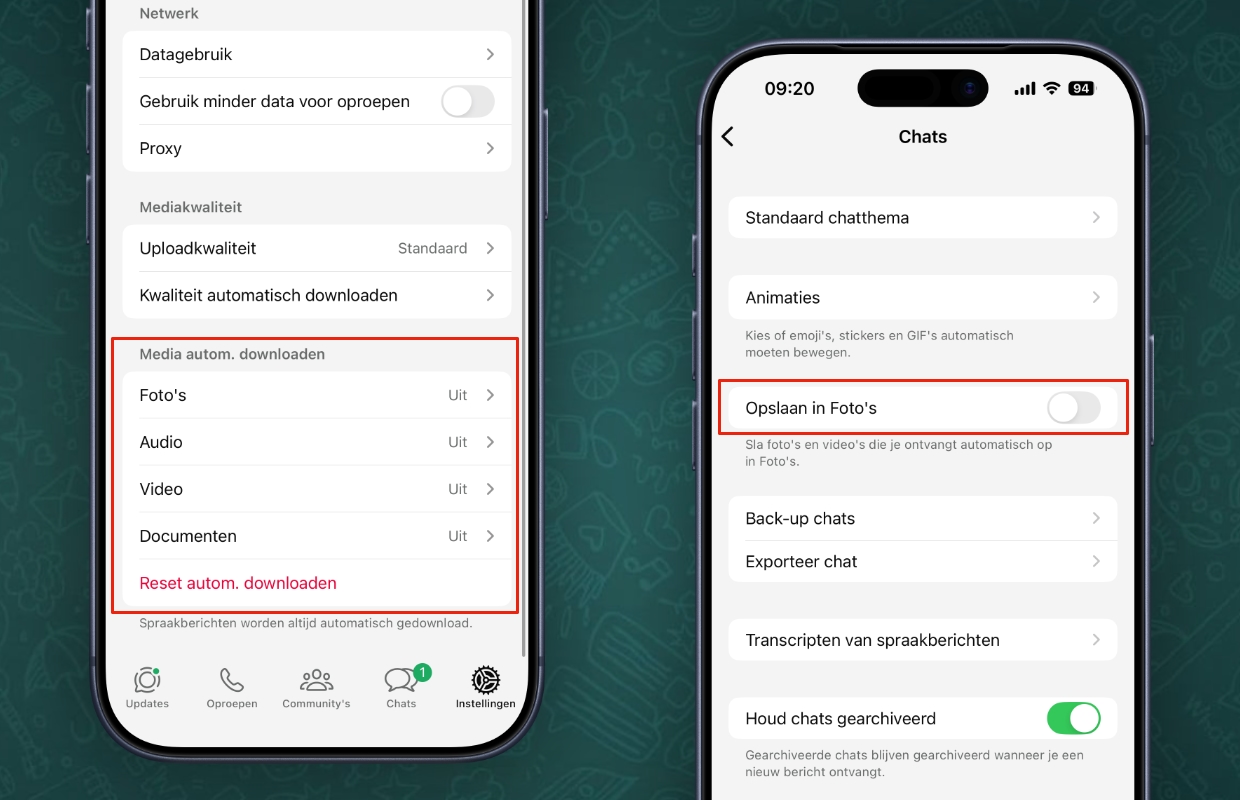
In the new form of scam via WhatsApp, criminals try to put malicious files on your smartphone. They do this by sharing photos, videos or documents via unknown numbers. It is important that you do not open or install it on your smartphone. WhatsApp automatically downloads new files to your device by default, but you can also disable this. You do this with the following functions:
- Open ‘WhatsApp’;
- Tap ‘Settings’ at the bottom right;
- Go to ‘Storage and data’;
- Tap ‘Photos under ‘Automatically download media’;
- Choose ‘Never’;
- Go back to ‘Storage and data’;
- Then turn on ‘Never’ for ‘Audio’, ‘Video’ and ‘Documents’.
Have you disabled automatic downloading of photos, audio, video and documents? Then you are much better protected against the new form of scam in WhatsApp. It is also advisable to turn off the switch behind ‘Save in Photos’ in WhatsApp under ‘Settings > Chats’, so that forwarded images are no longer automatically added to the Photos app. This way you can be sure that no dangerous files are unintentionally stored on your device and you save storage space.
More about WhatsApp
Disabling automatic downloads via WhatsApp is an important option, because it prevents scammers from putting photos, videos and other files on your iPhone or Android device. These are usually saved automatically when you receive them, making it easy for dangerous malware to end up on your smartphone. By disabling automatic downloads you remove that option.
Have you disabled the automatic downloads in WhatsApp and are you receiving a message with possible fraud? In that case, it is wise to delete the conversation and block the unknown sender. The documents are no longer stored on your iPhone or Android device, so they have no effect on the device. Did you find this tip useful and would you like to know more? Then sign up for our daily or weekly newsletter so you always stay informed!

Download the iPhoned app

Subscribe to our newsletter