
The latest update for your iPhone is here and is packed with useful features. Time to make your iPhone completely up to date with iOS 26.2!
iOS 26.2 is out and brings many new features to your iPhone
Good news for iPhone users: iOS 26.2 is available! This update not only brings some cool improvements, but also really nice new features. Whether you do a lot with your iPhone or just use it for the basics, there is always something in iOS 26.2 that will make you happy. These are the new features!
1. Improved sleep score
According to Apple, the Sleep Scores are calculated based on, among other things, how long you have slept, when you fall asleep and whether you wake up in between. The feature is available in the Health app on all iPhone models compatible with iOS 26 and on all Apple Watch models with watchOS 26.
In iOS 26.2 and watchOS 26.2, the Sleep Score has been adjusted as follows:
- Very low: 0-40 (previously 0-29);
- Low: 41-60 (previously 30-49);
- OK: 61-80 (previously 50-69);
- High: 81-95 (previously 70-89);
- Very high: 96-100 (previously 90-100).

2. Apple Music: offline lyrics
One of the new features in iOS 26.2 is offline lyrics in Apple Music. You can also read them if you are not connected to WiFi or a mobile network.
3. Set Liquid Glass for the clock
You can now control the amount of Liquid Glass the clock uses via a new slider in the lock screen settings. This way you can easily set how transparent or how matte the effect should be.
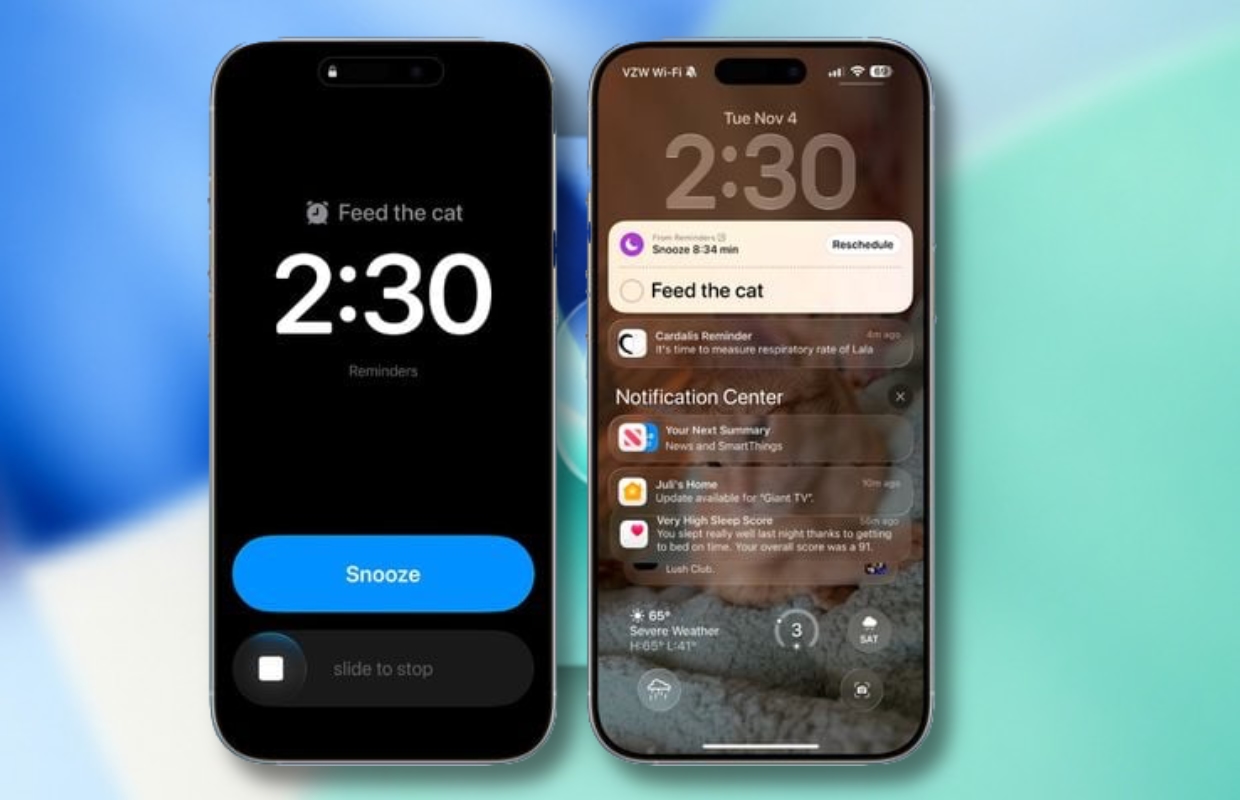
4. Link alarm in Reminders
In iOS 26.2, you can link an alarm to a reminder in Apple’s Reminders app. Add a reminder, choose a time, then enable the ‘Urgent’ option. An alarm will then automatically sound at the selected time.
5. Flash of light for incoming notifications
Starting with iOS 26.2, your iPhone’s screen may show a short flash of light when you receive a notification. Previously, this function only worked with the LED flash on the back of the device.
6. Live translations for AirPods
A notable innovation in iOS 26.2 is Live Translations via AirPods within the EU. This allows you to effortlessly follow conversations with someone who speaks a different language. It works smoothest when you both use AirPods with Live Translations. Are you talking to someone without AirPods? No problem, because your iPhone simply shows a live transcription in the language of your conversation partner.

7. Sort by size
In the Games Library you can now also sort your games by file size. Handy if you want to quickly free up storage and track down the biggest space wasters. But that’s not all: the update also adds navigation with a controller and lets you update your challenge scores live while you play.
8. CarPlay: Clear pinned messages
CarPlay’s Messages app previously gained the ability to show pinned conversations. But not every driver found this option useful. Because on smaller screens it could get a bit messy.
That is why you can set in iOS 26.2 that the pinned conversations are visible or not. Do you turn off the pinned messages? Then you will only see recent conversations in the message list.
9. Improvements for the PodCasts app
Apple’s Podcasts app gets three useful innovations in iOS 26.2: episodes automatically get chapters, you see timed links appear at exactly the right time, and you can immediately click through to other podcasts mentioned in an episode.

10. AirDrop with specific people
AirDrop also gets a new feature. You can then AirDrop with a specific person without them being in your contacts. You then create a special code that you share. After that, the devices can communicate with each other via AirDrop for 30 days.
11. Excluded websites in Passwords
In the Settings of the Passwords app (Settings > Apps > Passwords), you will now find a new section where you can manage the websites for which you have deliberately not saved any data. You will find this option under ‘Show excluded websites’.
12. Other updates
The update to iOS 26.2 has a number of other new features, but they are not available here. For example, the Apple News app has been updated and Japanese iPhones can now customize the Siri button. In addition, the update also contains the necessary security updates.
Install iOS 26.2: this is how you do it
Your iPhone will usually automatically notify you when you can update, but if you don’t want to wait for it, you can always check it yourself. You do this in the following way.
- Open the ‘Settings’ on your iPhone;
- Go to ‘General’ and tap ‘Software update’;
- Install the update.
Can’t update yet? Then there is often nothing wrong. It may take a while before the update becomes available to everyone.
Do you want to know as soon as possible when Apple will release a new update? Or the most recent Apple news clearly in your mailbox? Then subscribe to the newsletter.

Download the iPhoned app
